There’s a moment every SaaS founder goes through. You’ve got somewhere between 5 and 25 customers, your first sales hire just started, and someone in a Slack thread says “we need to get off spreadsheets.” And suddenly you’re three hours deep into a comparison between HubSpot and Salesforce, reading articles written for 500-person companies, wondering if any of this applies to you.
It mostly doesn’t. And that’s the problem.
Most CRM comparison content is written for enterprise buyers with dedicated RevOps teams, procurement budgets, and six-month implementation timelines. If you’re a B2B SaaS startup with under 50 people trying to build a repeatable sales motion without burning your runway on software overhead, you need a different conversation.
This guide is that conversation. We’re going to cover pricing that reflects what you’ll actually pay (not the per-seat number on the pricing page), feature comparisons that map to how SaaS teams actually work, and the one data problem that neither CRM solves – which quietly kills more SaaS pipelines than platform choice ever does.
Bottom line upfront: For most B2B SaaS startups under 50 people, HubSpot is the right starting point. It’s faster to deploy, dramatically cheaper to run, natively connects marketing and sales, and has strong AI tools at no extra cost. Salesforce makes sense when you hit genuine enterprise complexity – typically Series B and beyond, with a dedicated RevOps hire and multi-territory sales motion. But platform choice is only half the problem. The bigger issue is that neither CRM tells you who’s actively researching your solution right now – and for early-stage SaaS teams where every deal matters, that intelligence gap is the real drag on pipeline.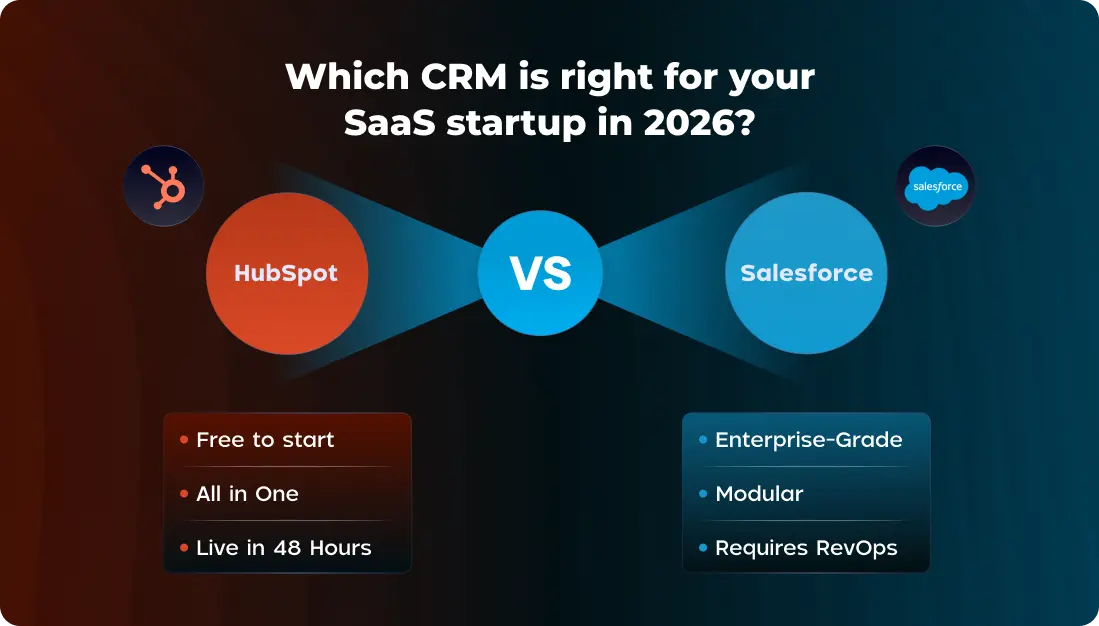
Why This Decision Carries More Weight Than Most Founders Realize
Picking the wrong CRM at the wrong stage doesn’t just cost money – it costs momentum. Here’s what actually happens when SaaS teams get this wrong:
The Salesforce-too-early trap: A well-meaning investor or CTO says “just use Salesforce, it’s what everyone uses.” The team spends two months configuring it (or paying an implementation partner to). Three months later, reps are still logging deals in a spreadsheet because Salesforce is too slow to update on mobile. The CRM becomes a reporting tool for leadership, not a working tool for sales. Data goes stale. Pipeline reviews become unreliable. And nobody wants to admit the $40,000 implementation was a mistake.
The spreadsheet-too-long trap: The team delays the CRM decision until it’s genuinely painful – usually when a second sales hire joins and deals start falling through cracks between two people’s inboxes. By then, there’s no historical pipeline data, no email tracking, no lead source attribution. You’re starting from zero at exactly the moment you need momentum.
The wrong-CRM adoption trap: The team picks HubSpot but treats it like a contact database instead of a revenue operating system. Nobody builds sequences. Lead scoring is ignored. The marketing team uses a separate email tool. Inbound leads get manually forwarded to reps by email. You’re paying for a Ferrari and using it to get groceries.
The CRM decision isn’t just about features. It’s about choosing a platform your team will actually use, that matches your current workflow complexity, and that doesn’t create a maintenance burden that steals time from selling.
For B2B SaaS startups, there are five things that should drive the decision:
- Time to value – how fast can your team be productive in it?
- Total cost of ownership – what will you actually pay over 3 years, including admin and add-ons?
- Marketing + sales integration – can both functions run in one place without an extra tool?
- LinkedIn and Sales Navigator sync – how well does it connect to your primary prospecting channel?
- Data quality and intent visibility – does it tell you who to call right now, or just store who you’ve already called?
What Real SaaS Teams Say About Both Platforms
Before the feature breakdown, here’s what actual founders and sales leaders report from the trenches – because real-world experience cuts through vendor marketing faster than any feature table.
On choosing HubSpot for early-stage SaaS:
“HubSpot’s free CRM is genuinely not a toy. For a pre-revenue SaaS startup, it covers months of runway before you spend a dollar. Stripe sync alone is worth it – you can see who converted from free to paid inside your contact records without building anything custom.”
“HubSpot is more marketer-friendly out of the box, especially for connecting ads to landing pages to email nurture. Salesforce would require a dedicated ops person to set up the same workflow, and we just don’t have that person yet.”
“We tried Salesforce first. Spent three months configuring it with a consultant. Nobody used it. Switched to HubSpot and had the whole team running deals in it within a week. The consultant cost $28,000. We still think about that.”
On the Salesforce reality for early-stage teams:
“Skip Salesforce until you have at least 10 dedicated salespeople and a full-time RevOps hire. Before that, the complexity is a tax on your team’s time that scales faster than your revenue.”
“Salesforce is incredible – when you have the people to run it. We didn’t. We were a 12-person team pretending to be an enterprise and our CRM reflected that delusion.”
“The hidden cost of Salesforce isn’t the license. It’s the admin. We hired a Salesforce admin at $95K and within a year realized we were spending more on CRM operations than on actual sales tools.”
On migrating between the two:
“Migrating from Salesforce to HubSpot is very doable. How painful it is depends entirely on how customized your Salesforce setup was. If you kept it clean, migration takes weeks. If you let consultants go wild building custom objects for three years, you’re in for a project.”
“We moved from HubSpot to Salesforce at Series B. Took 4 months. Cost $60K including the partner and new admin hire. Zero regrets – we needed it by then. But if we’d done it at Seed we would have died.”
The pattern across dozens of startup CRM conversations is consistent: teams that start on HubSpot and graduate to Salesforce at the right stage have smooth trajectories. Teams that start on Salesforce too early almost always go through a painful period of low adoption before either migrating back or investing heavily in making it work.
Pricing: What You’ll Actually Pay at Each SaaS Stage
HubSpot Pricing for SaaS Startups
The way HubSpot is structured is unusually well-suited to SaaS growth stages – you can genuinely start free and upgrade in line with revenue milestones.
Free Plan ($0):
Full CRM – contacts, companies, deals, tasks, email tracking, meeting scheduling, live chat, and up to 5 users. This isn’t a crippled trial. It’s a real CRM that early-stage teams run for months or years. The Stripe integration is available on the free plan, which means you can track free-to-paid conversion events inside contact records from day one.
Starter ($15–$20/user/month):
Removes HubSpot branding, adds basic email automation, simple deal workflows, and expanded meeting links. For a 3–5 person team doing outbound alongside inbound, this is the first paid tier worth considering. Monthly cost for a 5-person team: ~$75–$100/month.
Professional (from $800/month for 5 seats included):
This is where HubSpot genuinely becomes a complete revenue stack. You get full marketing automation – email sequences, A/B testing, dynamic content, workflows – alongside full sales pipeline management, custom reporting, predictive lead scoring, and ABM tools. The critical thing to understand: that $800/month includes Marketing Hub, Sales Hub, and the CRM in one price. You’re not paying separately for email marketing, CRM, and automation.
Enterprise (from $3,600/month for 7 seats):
Custom objects, advanced revenue attribution, sandboxes, custom behavioral events, and the full Breeze AI suite including predictive scoring. This is the tier most Series A+ SaaS companies graduate to before evaluating whether Salesforce is actually needed.
Salesforce Pricing for SaaS Startups
Salesforce’s pricing structure is modular, which sounds flexible but in practice means you pay for each capability you need separately.
Starter Suite ($25/user/month):
Very limited – basic pipeline, email integration, maximum 10 users. Genuinely not suitable for a SaaS startup planning to grow. Think of it as a try-before-you-buy entry point.
Professional ($80–$100/user/month):
Full pipeline management and forecasting. Still no marketing automation. A 10-person team pays $9,600–$12,000/year in licenses alone – but you still need to add marketing automation, and Pardot/MCAE starts at $1,250/month extra.
Enterprise ($165/user/month):
The first tier with full customization – custom objects, Apex workflows, advanced reporting. A 10-person team is now at $19,800/year in licenses. Add Pardot ($15,000/year), implementation ($15,000–$50,000), and a part-time admin ($40,000–$60,000/year for fractional) and you’re looking at a first-year cost of $90,000–$145,000.
Agentforce AI add-on ($125/user/month):
Enterprise and Unlimited only. Not available on lower tiers regardless of how much you want it.
The Real 3-Year Cost Comparison
This is the table most CRM comparisons skip because the numbers are uncomfortable for Salesforce:
| Cost Component | HubSpot Professional (10 users) | Salesforce Enterprise (10 users) |
|---|---|---|
| License (Year 1) | ~$12,300 | ~$19,800 |
| Implementation | $2,000–$8,000 | $15,000–$50,000 |
| Marketing automation | Included | +$15,000/yr (Pardot/MCAE)prospeo |
| Admin cost (Year 1) | $0 – self-managed | $40,000–$120,000 |
| Data enrichment | $0 (basic Breeze) | Requires Data Cloud add-on |
| 3-Year TCO estimate | ~$50,000–$65,000 | ~$220,000–$380,000 |
For a startup burning $100K–$200K/month, that gap represents 1–3 months of runway. For a pre-Series A team, it’s the difference between hiring another SDR and paying for software overhead nobody uses.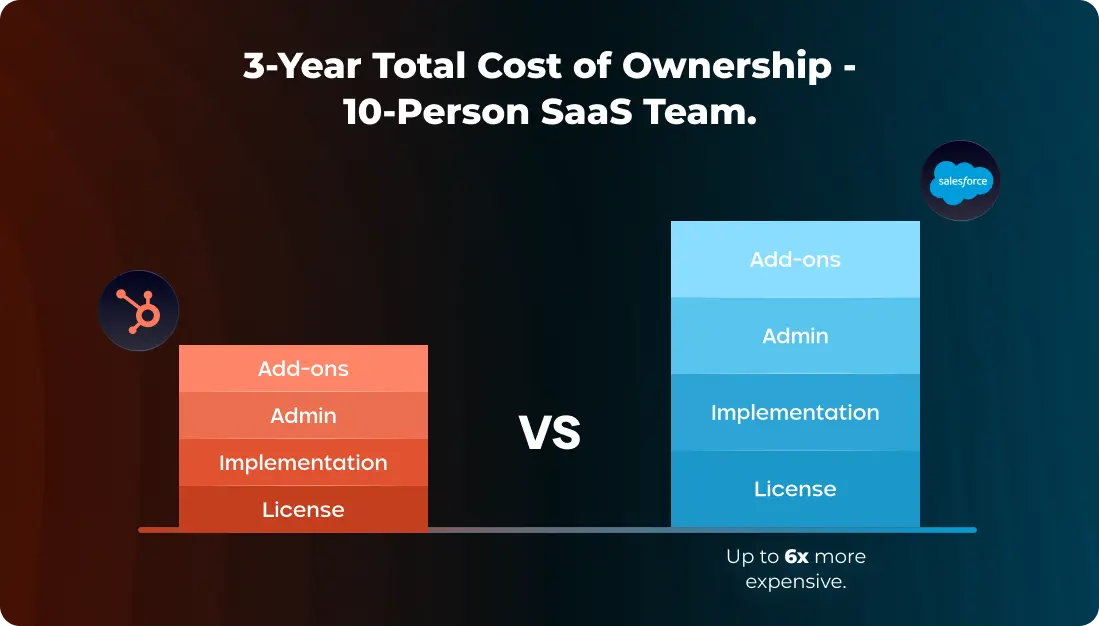
Feature Comparison: What SaaS Teams Actually Need
Pipeline Management for the SaaS Sales Motion
SaaS companies have deal stages that don’t map well to generic CRM templates. You’re likely running stages like: Prospect → Discovery → Demo → Technical Evaluation → Procurement → Closed Won. And if you’re PLG, you have a parallel motion where free users convert to paid accounts without ever speaking to a rep – requiring entirely different pipeline logic.
HubSpot pipeline management for SaaS:
HubSpot’s pipeline builder is genuinely excellent for SaaS workflows. You can create multiple pipelines in the same account – one for your sales-led motion, one for your PLG expansion motion, one for renewals. The visual drag-and-drop deal board is fast enough that reps actually use it on mobile after calls. Workflow automation triggers on deal stage changes – so when a deal moves to “Technical Evaluation,” a task automatically creates for your solutions engineer, and a Slack notification fires to the AE. None of this requires admin support or custom code.
The Stripe integration is a standout feature that most SaaS teams don’t realize exists. Connect Stripe and your contact records automatically show subscription status, MRR, plan tier, billing events, and trial expiration dates. For a SaaS team that lives at the intersection of product usage and sales conversations, having that data inside the CRM – without a custom integration build – is a meaningful productivity advantage.
Salesforce pipeline management for SaaS:
Salesforce’s pipeline management is more powerful in absolute terms – you can model virtually any sales process with enough configuration. Multi-product opportunities, complex approval workflows, territory-based lead routing, custom forecast categories – all possible. But here’s the catch for early-stage teams: every one of those capabilities requires an admin to build and maintain it. The out-of-the-box Salesforce experience is surprisingly bare for what it costs. You’re paying for a platform, not a ready-to-run CRM.
For a 10-person SaaS team at $1M ARR, Salesforce’s ceiling is irrelevant. You don’t need multi-territory routing. You don’t need custom Apex triggers. You need a pipeline your two AEs will actually update after calls. That’s a HubSpot problem to solve.
Verdict on pipeline: HubSpot for teams under 25 salespeople. Salesforce when you have dedicated RevOps and genuine process complexity that maps to its capabilities.
Marketing Automation: The Make-or-Break Feature for SaaS
This is where the comparison gets decisive for most SaaS startups.
SaaS teams almost universally run marketing and sales from the same small team. Your head of growth writes the blog posts, manages paid ads, runs LinkedIn outreach, and oversees email nurture – possibly all as one person. If your CRM doesn’t natively handle marketing automation, you’re paying for a second tool (Mailchimp, ActiveCampaign, Klaviyo) and managing attribution across two separate systems. That’s fragmentation that kills your ability to understand what’s actually driving pipeline.
HubSpot’s Marketing Hub is fully native to the CRM. Your landing pages, forms, email campaigns, blog, social scheduling, and paid ad management all live in the same platform as your contact records, deals, and pipeline. When a prospect clicks your LinkedIn ad, downloads your pricing guide, and books a demo – you see the entire journey in one place. You know which LinkedIn campaign sourced the deal. You know what content they consumed before booking. Your lead score reflects their full behavioral history.
Salesforce Sales Cloud has zero native marketing automation. None. When people compare “Salesforce” to HubSpot for marketing, they’re usually talking about Salesforce Marketing Cloud (formerly ExactTarget) or Marketing Cloud Account Engagement (formerly Pardot) – both of which are entirely separate products with separate pricing. MCAE starts at $1,250/month. Marketing Cloud starts significantly higher.
For a SaaS startup doing inbound marketing + outbound sales, choosing Salesforce means immediately budgeting for a second marketing automation tool. For most teams under 50 people, that’s an unnecessary complexity and cost.
LinkedIn Sales Navigator Integration: Your Primary Prospecting Channel
If your SaaS sales team does outbound, they’re living in LinkedIn Sales Navigator. It’s the primary research and prospecting tool for B2B SaaS SDRs and AEs – used to find ICP accounts, track job change alerts, monitor company growth signals, and run connection + InMail sequences.
How well your CRM integrates with Sales Navigator has a direct impact on rep productivity. Here’s the honest breakdown:
HubSpot + LinkedIn Sales Navigator:
The integration requires Sales Hub Professional or higher (included in the $800/month Professional plan). Inside HubSpot contact and company records, a LinkedIn panel shows the prospect’s profile, shared connections, job history, and recent activity. Reps can send InMails from within HubSpot, and Sales Navigator “Smart Links” track prospect engagement. However – and this is critical – LinkedIn activity does not automatically log to the HubSpot contact timeline. If a prospect views your profile, engages with your content, or changes jobs, that signal doesn’t automatically flow into HubSpot. Your rep has to check manually.
Salesforce + LinkedIn Sales Navigator:
The integration at Enterprise level is slightly deeper – embedded LinkedIn panels in contact views, more consistent InMail logging, and tighter sync with Sales Navigator lists. But the same fundamental limitation exists: LinkedIn’s algorithmic activity data does not feed into Salesforce records. Job change alerts, content engagement, profile views from target accounts – none of it flows into your CRM natively.
The gap both integrations share:
Neither HubSpot nor Salesforce actually enriches your CRM records from LinkedIn data. You can view LinkedIn information inside the CRM, but the verified email, direct phone number, updated job title, and company firmographics from a prospect’s LinkedIn profile don’t automatically populate your contact fields. Every rep manually copies this data, which takes time, creates errors, and creates inconsistent records across the team.
This is the workflow breakdown that creates the real productivity gap in LinkedIn-driven SaaS sales teams – and it’s the exact problem that a data enrichment layer like LeadCRM solves (covered in detail below).
Reporting and SaaS-Specific Metrics
SaaS teams need metrics that standard CRM reporting wasn’t built for – free trial conversion rate, time-to-activation, expansion MRR, churn risk by cohort. Here’s how both platforms handle the metrics that matter:
| Metric | HubSpot | Salesforce |
|---|---|---|
| Pipeline velocity & deal stage time | Native dashboards, visual | Configurable, more powerful |
| Lead source attribution | Multi-touch, native (Pro+)performancemarketingadvisors | Advanced with Tableau (additional cost) |
| MRR/ARR tracking | Via Stripe sync on Professional | Revenue Cloud (additional product) |
| Free trial → paid conversion | Workflow-based event tracking | Custom objects required |
| Churn prediction | Basic (Enterprise) | Einstein AI (Enterprise+ with add-on) |
| Rep activity tracking | Native – calls, emails, tasks | Native – similar depth |
| Custom dashboards | Up to 300 dashboards (Enterprise) | Unlimited (with admin to build) |
| Cohort analysis | Limited | Tableau integration (cost extra) |
For pre-Series A SaaS teams, HubSpot’s reporting is more than sufficient for every weekly pipeline review, board report, and investor update you’ll run. The limitations surface at Series B+ when you need multi-dimensional attribution across large sales teams, or complex cohort-based revenue forecasting across multiple product lines.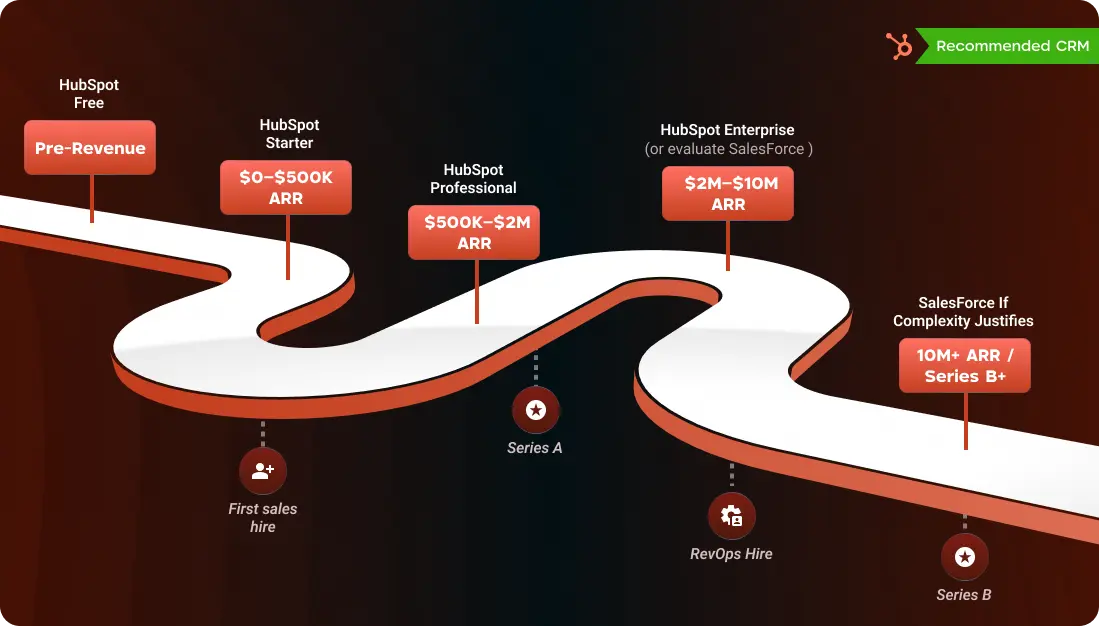
AI in 2026: What HubSpot Breeze and Salesforce Agentforce Actually Do for SaaS Teams
AI has become the loudest battleground in CRM marketing. Both platforms made massive AI investments in 2024–2025. Here’s what that actually means for a 15-person SaaS sales team.
HubSpot Breeze AI – What’s Actually Useful
Breeze Copilot is the conversational AI layer inside HubSpot. You can ask it “summarize the last 3 interactions with this account” before a call, “draft a follow-up email based on the demo notes,” or “which deals in my pipeline have gone cold?” It operates with full context from your CRM data – contact history, deal stage, recent emails, company news. For reps who use it, call prep time drops from 20 minutes to under 5.
Breeze Prospecting Agent is genuinely impressive for SaaS SDR teams. It researches target accounts – pulling in company news, LinkedIn activity, recent funding events, tech stack signals – and drafts personalized outreach automatically. An SDR can review and send 50+ personalized messages per day instead of manually researching and writing each one. The agent runs inside HubSpot, so everything it does is logged to the contact record without any extra steps.
Predictive Lead Scoring (Enterprise) uses behavioral data – email opens, page visits, form submissions, product usage events from Stripe – to automatically score leads by conversion probability. Instead of your rep deciding which free trial accounts to focus on, HubSpot tells them.
Critically for budget-constrained startups: All of Breeze AI is included in your existing HubSpot plan. No per-seat add-on. A 15-person team at HubSpot Professional gets the full AI suite at no additional cost.
Salesforce Agentforce – Powerful, But Built for Enterprise Budgets
Salesforce’s AI vision is genuinely more ambitious. Agentforce creates fully autonomous AI agents that can manage pipeline stages, respond to inbound inquiries, route leads, update records, and escalate deals – all without human intervention. The Atlas Reasoning Engine makes multi-step decisions across your entire Salesforce data model.
For a well-staffed enterprise with complex sales processes, this is transformative technology. For a 15-person SaaS startup, it’s a capability you can’t access without first paying for Enterprise tier ($165/user/month) and then adding Agentforce at $125/user/month. That’s $290/user/month minimum – or $52,200/year for 15 people, just for AI features.
The irony is that Salesforce reports Einstein saves sellers 3.5 hours per day. Even if that’s accurate, the ROI calculation for a startup burning runway doesn’t work at that price point.
AI Verdict: HubSpot Breeze delivers real, daily-use AI value at zero incremental cost. Salesforce Agentforce sets a higher ceiling but requires enterprise-tier investment before you can touch it. For SaaS startups, this isn’t a close call.
Common Mistakes SaaS Teams Make When Choosing a CRM
These are the decision errors that show up most frequently – and they’re worth confronting before you sign a contract.
Mistake 1: Choosing what your investors use, not what your team needs.
Salesforce has strong brand presence in VC circles. Some investors casually recommend it because it’s what portfolio companies use at Series C. That doesn’t mean it’s right for your Seed-stage team. Ask any investor recommending Salesforce whether they’ll pay for the implementation and admin costs. The answer clarifies the advice quickly.
Mistake 2: Evaluating features you won’t use for 18 months.
Salesforce’s territory management, multi-currency support, and custom Apex logic are genuinely powerful. They’re also features a 10-person SaaS team has no use for. Evaluating a CRM on capabilities you don’t currently need leads to overpaying for complexity that creates adoption problems today.
Mistake 3: Ignoring total cost of ownership.
A $25/user/month Salesforce Starter plan sounds competitive until you realize it caps at 10 users, excludes marketing automation, and requires a partner to implement anything non-trivial. Always model Year 1 and Year 3 costs including admin, implementation, and the tools you’ll need to add.
Mistake 4: Treating data quality as someone else’s problem.
Both HubSpot and Salesforce are containers. What you put in determines what you get out. Teams that import a messy CSV of 3,000 unverified contacts and call it a pipeline are setting themselves up for low deliverability, wasted outreach, and unreliable reporting. Data hygiene and enrichment need to be part of your CRM setup plan from day one, not an afterthought at month six.
Mistake 5: Not connecting LinkedIn activity to CRM data.
If your team uses LinkedIn Sales Navigator for prospecting – which most B2B SaaS teams do – and your CRM isn’t enriched with data that makes those interactions actionable, you’re creating double work. Reps save leads in Sales Navigator and then manually recreate them in the CRM. Activity on LinkedIn never makes it into the contact timeline. This friction compounds over months into a broken workflow.
Mistake 6: Evaluating CRM without evaluating data and intent.
The CRM platform is the foundation – but the intelligence layer on top of it determines how effectively your team uses it. Neither HubSpot nor Salesforce tells you which accounts are actively researching your category right now. That signal – intent data – is what separates teams that reach out at the right moment from teams that follow up weeks too late.
The Data Gap That Neither CRM Solves
This is the part most comparison guides skip, and it’s arguably the most important section for SaaS teams to read.
Your CRM records what happens after a lead identifies themselves – a form fill, a demo booking, an inbound email. That’s the visible 20% of the buyer journey. The other 80% happens before any of that: the prospect reading three comparison articles about tools in your category, visiting G2 to read reviews, comparing your pricing to a competitor’s, watching a LinkedIn video your CEO posted two weeks ago. Your CRM knows none of it.
For B2B SaaS teams with 30–90 day sales cycles, the timing of your outreach is often more important than the content of it. A cold email to a prospect who is actively researching your category converts at completely different rates than the same email sent to someone who isn’t. Intent data tells you which scenario you’re in.
The B2B database decay problem compounds this. The average B2B contact database loses 25–30% accuracy per year. People change jobs, get promoted, leave companies. A contact you spoke to 8 months ago might have a new email, a new job title, and a new set of priorities. HubSpot’s Breeze Intelligence has limited coverage for niche SaaS verticals. Salesforce’s Data Cloud is real but requires Enterprise tier and additional budget. Neither automatically keeps your records fresh.
The result: SaaS teams spending thousands per month on a CRM platform are working from records that are 30–40% outdated, missing the intent signals that would tell them who to prioritize, and doing hours of manual research on LinkedIn to find data their CRM should already have.
How LeadCRM.io Closes the Gap – for HubSpot and Salesforce Users
LeadCRM.io is built specifically for this problem – and it connects natively to both platforms, so it doesn’t matter which CRM you choose.
Automated Record Enrichment:
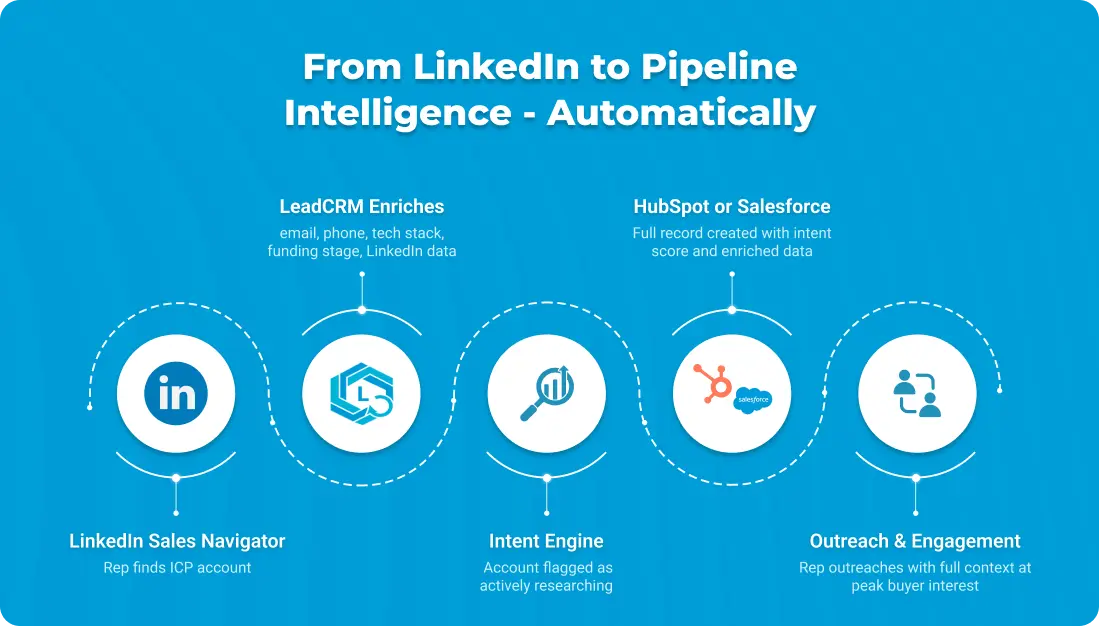
Every contact and company in your HubSpot or Salesforce gets automatically enriched with verified email addresses, direct-dial phone numbers, updated job titles, company size, funding stage, technology stack, and LinkedIn profile data. When your SDR saves a lead from Sales Navigator, LeadCRM enriches the CRM record automatically – no manual copying, no stale data.
Tech stack intelligence for SaaS is particularly powerful: Knowing that a target account is currently using a competitor’s tool, or that they recently adopted a technology that integrates with your product, changes how you position your outreach. That signal, populated automatically into your CRM before your rep ever makes contact, is the difference between a generic pitch and a relevant one.
Intent Signal Surfacing:
LeadCRM monitors which companies are actively researching topics related to your product category – reading comparison content, visiting review sites, engaging with competitor marketing. Those accounts are surfaced inside your HubSpot or Salesforce pipeline, ranked by intent strength and recency.
For a SaaS startup with a 10-person sales team and hundreds of accounts in the pipeline, intent scoring means your reps know exactly which 15 accounts to call this week – not because they sat in a 90-minute pipeline review guessing, but because the data told them. Shorter cycles. Higher conversion. Less wasted outreach.
LinkedIn-to-CRM intelligence:
For SaaS teams using LinkedIn as their primary prospecting channel, LeadCRM bridges the gap between Sales Navigator activity and CRM records. Job change alerts, company growth signals, and LinkedIn engagement data flow into contact timelines automatically – so your reps have context they can act on without leaving the CRM.
Think of it this way: HubSpot or Salesforce is the engine of your revenue machine. LeadCRM is the GPS – not just showing you where you’ve been, but telling you exactly where to go next, and which accounts are ready to engage right now.
 See how LeadCRM enriches your SaaS pipeline – works with HubSpot and Salesforce →
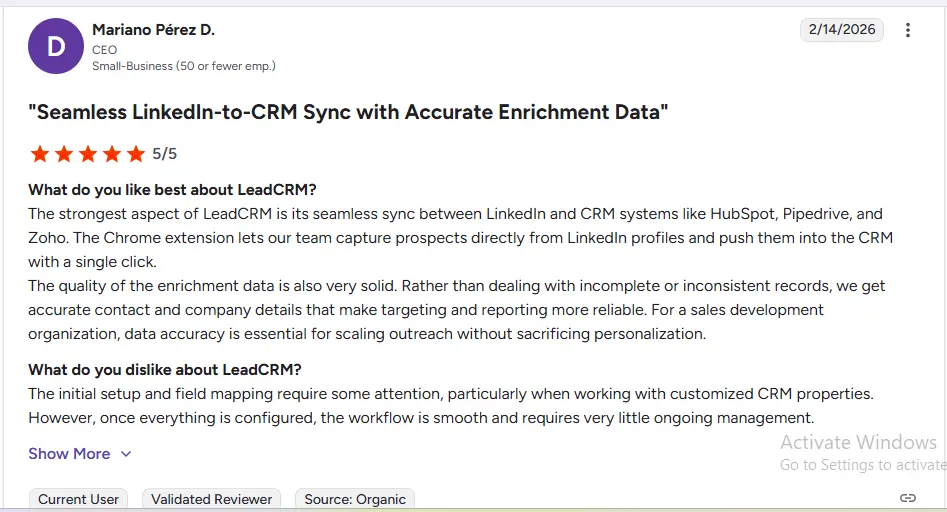
LeadCRM provides seamless LinkedIn-to-CRM sync — our team can capture prospects directly from LinkedIn and push them into HubSpot with a single click, complete with accurate enrichment data.” — Verified G2 Review
HubSpot vs Salesforce by SaaS Growth Stage
| ARR Stage | Team Size | Recommended CRM | Reasoning |
|---|---|---|---|
| Pre-revenue | 1–5 | HubSpot Free | Zero cost, full CRM, Stripe sync, builds habits early |
| $0–$500K ARR | 5–10 | HubSpot Starter | $75–$150/mo total, automation basics, deal tracking |
| $500K–$2M ARR | 10–20 | HubSpot Professional | Full marketing + sales stack, AI included, solid reporting |
| $2M–$5M ARR | 15–30 | HubSpot Professional/Enterprise | Evaluate if customization gaps are real, not theoretical |
| $5M–$15M ARR | 25–50 | HubSpot Enterprise or Salesforce | Depends on RevOps maturity and sales complexity |
| $15M+ ARR | 50+ | Salesforce Enterprise | Multi-product, multi-territory, dedicated admin justified |
Switching Between Platforms: What You Need to Know
Moving from Salesforce to HubSpot
This is increasingly common among growth-stage SaaS companies. The typical triggers are low adoption, cost overruns, or a marketing team that can’t run campaigns without paying for Marketing Cloud. HubSpot has dedicated Salesforce migration tools and a well-documented import process. Most teams of 10–20 people are fully migrated and running in 30–45 days.
The variables that affect migration complexity: how customized your Salesforce setup is, how clean your data is, and how many custom integrations you’ve built. If you kept Salesforce relatively clean, migration is straightforward. If consultants spent two years building custom objects and Apex triggers, you’ll need a proper migration project – but even then, it’s almost always worth it for teams under 50 people.
Teams that make the switch consistently report faster rep adoption within the first 30 days, which is ultimately the metric that matters most.
Moving from HubSpot to Salesforce
The right time to make this move is when your sales complexity genuinely exceeds HubSpot’s capabilities – not when you expect it might someday. Typical indicators: you have 10+ dedicated salespeople, you’ve hired a RevOps lead, you’re running multi-territory deals, or you need custom objects that HubSpot Enterprise can’t handle.
Budget 3–6 months for the migration. Include implementation partner costs ($15,000–$50,000 minimum), admin hiring or contractor costs, and a realistic 60-day productivity dip as reps learn the new system.
Starting from scratch
Start on HubSpot Free. Connect Stripe. Import your current contacts – verify and enrich them before importing, not after. Run your first pipeline for 60–90 days. By then you’ll have real data on what your team needs, and you’ll make the right long-term CRM decision based on actual workflow experience rather than vendor demos.
The Verdict: Which CRM Wins for B2B SaaS Startups?
For B2B SaaS teams under 50 people, HubSpot wins at every stage up to approximately $10M ARR on the metrics that matter most for startups:
- Time to live: hours vs months
- Three-year TCO: $50K–$65K vs $220K–$380K for a 10-person team
- Marketing + sales in one tool: native vs. expensive add-on
- AI features: included vs. $125/user/month add-on
- Stripe/MRR integration: native vs. custom build
- Admin required: no vs. almost always yes
Salesforce becomes the right choice when you have real enterprise complexity that justifies the investment – typically post-Series B, with dedicated RevOps, 10+ salespeople, and multi-territory deals. That’s not a slight against Salesforce; it’s one of the most powerful business platforms ever built. It’s just a platform optimized for a stage of growth most startups haven’t reached yet.
Whichever platform you choose, treat data quality and intent intelligence as a first-class priority – not an afterthought. The CRM is the foundation. LeadCRM is the intelligence layer that tells you who to talk to, when to talk to them, and what to say when you get there.
Quick Reference: HubSpot vs Salesforce for SaaS Startups
| Feature | HubSpot | Salesforce |
|---|---|---|
| Best SaaS stage | Pre-revenue to ~$10M ARR | Series B+ / $10M+ ARR |
| Free plan | Yes – full CRM + Stripe sync | No |
| Setup time | Hours to days | Weeks to months |
| Dedicated admin needed? | No | Yes, from day one |
| Native marketing automation | Yes – included | No – separate product |
| Stripe / MRR tracking | Native | Revenue Cloud (additional) |
| LinkedIn Sales Navigator | Pro+ plan, partial sync | Enterprise, slightly deeper |
| AI tools | Breeze AI – included | Agentforce – +$125/user/mo |
| 3-year TCO (10 users) | ~$50K–$65K | ~$220K–$380K |
| Native data enrichment | Limited | Limited |
| Native intent data |  | |
| With LeadCRM |  Enriched + Intent-aware Enriched + Intent-aware | Enriched + Intent-aware |