Most comparisons of HubSpot and GoHighLevel are written by affiliates — pushing GoHighLevel for its 40% recurring commission or positioning HubSpot as the safe professional default without telling you what it actually costs in Year 3.
This one is different.
We’ll tell you what both companies’ marketing pages hide: the startup discount cliff that blindsides founders at their first renewal, the per-seat scaling math that makes HubSpot brutally expensive as your team grows, the mandatory onboarding fees nobody mentions upfront, GoHighLevel’s email deliverability requirements that will destroy your domain if you skip them, the Gmail sidebar GoHighLevel simply doesn’t have, the support gap that frustrates users when complex workflows break — and the one capability neither platform has built at all.
By the end, you’ll know exactly which platform fits your situation — and why.
Quick answer:
- Team under 4, live in Gmail, B2B inbound strategy → HubSpot (model Year 2–4 costs before you commit)
- Team of 5+, need SMS, want predictable costs → GoHighLevel
- Digital marketing agency managing client accounts → GoHighLevel almost certainly
- Enterprise B2B, complex reporting, 2,000+ integration needs → HubSpot
What These Two Platforms Actually Are
HubSpot and GoHighLevel are not competing for the same customer.
HubSpot is an enterprise-grade CRM and inbound marketing platform built for B2B companies that grow through content marketing, SEO, and structured sales processes. It is polished, deeply integrated, and genuinely excellent — but it runs on a per-seat, per-contact pricing model that scales aggressively with team size.
GoHighLevel is an all-in-one sales and marketing platform built from the ground up for digital marketing agencies and small-to-medium businesses. Its defining advantage is a flat-rate subscription: unlimited users, unlimited contacts, and a sub-account model that lets agencies manage all their clients under one dashboard for one fixed monthly price.
The honest version of this comparison isn’t “which is better.” It’s “which is right for your situation.”
The Four Things Every Business Evaluates First
These are the features that drive the initial CRM evaluation — what most businesses are actually using day one.
1. Pipeline Management
Both platforms have visual Kanban pipelines with custom deal stages, values, close dates, and drag-to-move cards.
HubSpot’s pipeline is cleaner and faster. The deal record shows every interaction — emails, calls, meetings, notes — in a single scrollable activity timeline. A non-technical salesperson can be fully operational within an afternoon.
GoHighLevel’s pipeline handles multiple client accounts in one view, SmartLists that auto-filter by tags and behaviour, and a contact record showing history across every channel simultaneously. For agencies managing many pipelines, this consolidated view is powerful. For a solo business owner, it can feel busier than necessary.
Verdict: HubSpot wins on polish and first-day adoption. GoHighLevel wins for multi-channel, multi-client pipeline management.
2. Contact Creation and Management
Both handle contact creation from forms, manual entry, CSV import, and API. Both support custom properties, tags, and company associations.
HubSpot’s contact records are clean and automatically deduplicated — a single timeline of every touchpoint. GoHighLevel’s unified conversation inbox blends SMS, email, calls, and DMs in one thread per contact, which is genuinely useful for any business communicating across multiple channels.
Verdict: Roughly equal. HubSpot wins on UI clarity. GoHighLevel wins on multi-channel conversation history.
3. Inbound Forms and Lead Capture
Both platforms capture leads via forms that trigger workflows, create deals, and fire notifications — all without code.
HubSpot’s forms are deeply integrated with its marketing automation stack. GoHighLevel’s include surveys, multi-step forms, and order forms with payment processing — and they connect directly into the funnel builder for agencies building full client campaigns.
Verdict: Tie for standard forms. GoHighLevel edges ahead for complex funnel-embedded lead capture.
4. Calendar and Scheduling
HubSpot’s Meetings tool is available on the free plan and functionally replaces Calendly — a booking page synced with Google Calendar or Outlook, automated confirmation emails, and every booked meeting automatically logged on the contact’s CRM record with no manual entry required. At Starter ($15–$20/month), you get round-robin team scheduling, multiple meeting types, and pre-meeting qualification forms. If you’re paying for Calendly today, HubSpot Starter costs the same and gives you a full CRM alongside it.
GoHighLevel’s calendar is stronger for appointment-heavy local businesses — automated SMS reminders, group bookings, and calendar-triggered follow-up sequences that HubSpot’s meeting tool doesn’t match at the same depth.
Verdict: HubSpot wins on simplicity and free-plan value. GoHighLevel wins for appointment-intensive local service businesses.
Features HubSpot Has That GoHighLevel Doesn’t
The Gmail and Outlook Sidebar
HubSpot’s Gmail Chrome extension turns your inbox into a CRM terminal. Without leaving Gmail you can: see the complete contact record for whoever you’re emailing, insert pre-written email templates with one click, track email opens and link clicks in real time, log the email to the CRM automatically, insert your scheduling link, enrol the contact in a sequence, and use HubSpot’s AI to draft the message based on contact history.
For salespeople, consultants, and account managers who live in their inbox, this eliminates context-switching entirely. Every interaction is logged without discipline — the CRM stays current automatically.
GoHighLevel has no equivalent. GHL supports Gmail for email routing but has no sidebar that embeds CRM context, templates, and open tracking inside your inbox. If your team sends most of their communication from Gmail, this gap alone is significant enough to swing the decision.
The Mobile App
HubSpot’s mobile app is fast, clean, and covers the full core workflow: updating contacts, moving deals, logging calls and notes, completing tasks, sending tracked emails. The mobile experience matches the desktop in quality — not a stripped-down afterthought.
GoHighLevel’s mobile app handles basic functions but is consistently reported as less stable, less refined, and less feature-complete than the desktop version. For field sales teams, tradespeople, or any team working away from a desk, this difference directly affects whether pipeline data stays current in the field.
Features GoHighLevel Has That HubSpot Doesn’t
Native Two-Way SMS and Missed-Call Text-Back
Every GoHighLevel plan includes native two-way SMS, MMS, voicemail drops, and missed-call text-back — all inside the same automation workflows as email and pipeline updates. When a lead submits a form, GoHighLevel can send an SMS within 60 seconds, queue a call task, drop a voicemail if unanswered, and move the deal to the next stage — automatically, across channels, without third-party tools.
The missed-call text-back is transformative for local service businesses: when a prospect calls and nobody answers, GoHighLevel immediately sends them an SMS. For dentists, HVAC companies, law firms, and fitness studios — where an unanswered call typically means the prospect calls the next result on Google — this automation directly prevents lead loss. HubSpot has no native equivalent.
Unified Multi-Channel Conversation Inbox
GoHighLevel’s conversation inbox handles SMS, email, calls, Facebook Messenger, Instagram DMs, Google Business Messages, WhatsApp, and TikTok DMs in a single thread per contact. For local businesses where prospects reach out across different channels, this consolidated view eliminates context loss. HubSpot’s inbox is email-centric.
Sub-Accounts and Snapshots for Agencies
GoHighLevel’s sub-account model lets one agency account manage unlimited client accounts — each isolated with their own CRM, pipelines, and automations — for $297/month flat. Snapshots let agencies clone an entire proven client setup in minutes. Once you’ve built the ideal workflow for a dental practice client, every new dental practice client gets deployed in 20 minutes.
HubSpot requires separate portals per client, each with its own subscription or partner arrangement. No Snapshot equivalent exists.
The Honest Note on Funnels
GoHighLevel includes a full funnel builder with upsells, order bumps, and A/B testing. Important context most comparisons miss: most SMBs don’t build their own funnels — they outsource that work to agencies. If you’re a business owner (not an agency), the funnel builder is largely irrelevant to your daily operations. HubSpot’s landing page builder is sufficient for most SMB needs. For agencies running client campaigns, GoHighLevel’s funnel builder is purpose-built and superior.
Reputation Management
GoHighLevel sends automated Google and Facebook review requests post-appointment, monitors reviews, and handles responses from inside the platform. For local businesses where Google reviews drive new business, this is operationally significant. HubSpot has no native equivalent.
The Technical Setup Reality: Email Deliverability
This is a point almost no comparison covers — and it matters enormously for non-technical users.
HubSpot manages email deliverability out of the box. It guides you through domain authentication (SPF, DKIM, DMARC) in a clear setup wizard, maintains IP reputation at the platform level, enforces strict bounce and spam safeguards, and handles the technical infrastructure so you don’t have to think about it. For a non-technical business owner, you connect your domain and start sending — deliverability is handled.
GoHighLevel’s email runs on LC Email (Mailgun). It requires you to manually configure DNS records — SPF, DKIM, DMARC, and tracking CNAMEs — before sending any meaningful volume. If you skip this setup and blast 5,000 cold contacts on Day 1, your domain will be flagged immediately and your inbox placement will collapse. Additionally, GoHighLevel’s email uses shared IP infrastructure by default — meaning other senders on the same IP pool can affect your deliverability until you warm a dedicated IP separately.
For technically confident users or agencies who manage this setup for clients, this is a manageable one-time configuration. For non-technical SMB owners who expect to log in and start sending, it is a genuine risk that needs upfront awareness.
The practical implication: If you’re an SMB with no technical background buying GoHighLevel directly, budget either 2–4 hours to learn and implement the DNS setup or the cost of having an agency or developer do it for you before sending any bulk email.
The Pricing Reality: What You Will Actually Pay
GoHighLevel — Flat Rate, Honest Total
| Plan | Monthly | What’s Included |
|---|---|---|
| Starter | $97 | Full CRM, unlimited users + contacts, 3 sub-accounts, SMS, email, calendar, funnels, automations, courses, reputation management |
| Unlimited | $297 | Everything + unlimited sub-accounts, white-label desktop, API, advanced reporting |
| SaaS Pro | $497 | Everything + SaaS Mode (white-label resell with your branding, pricing, Stripe billing) |
No per-seat fees. No per-contact fees. $297/month with 2 users is $297/month with 20 users.
GoHighLevel’s real hidden costs: Communication channels bill separately via LC Phone and LC Email — approximately $0.008–$0.015/SMS, $0.021/minute for calls, and ~$0.001/email above the free allowance. A business sending 5,000 SMS/month adds approximately $50–$75 in usage costs. Factor this in, but even at $350–$450/month total, GoHighLevel undercuts HubSpot Professional for any team of 5+.
HubSpot — Per-Seat, Per-Contact, With a Mandatory Starting Fee
Before you pay your first month’s subscription at Professional or Enterprise tier, HubSpot charges a mandatory, non-negotiable onboarding fee:
| Plan | Mandatory Onboarding Fee |
|---|---|
| Marketing Hub Professional | $3,000 |
| Sales Hub Professional | $1,500 |
| Service Hub Professional | $1,500 |
| Marketing Hub Enterprise | $7,000 |
| Sales/Service Hub Enterprise | $3,500 each |
The only way to waive this fee is by working with a certified HubSpot Solutions Partner who absorbs the onboarding into their engagement. GoHighLevel charges $0 for onboarding — you log in and start building, or deploy a Snapshot.
The ongoing plan costs:
| Plan | Monthly | Seats Included | Add’l Seats |
|---|---|---|---|
| Free | $0 | 2 | — |
| Starter | $15–$20/seat | 1 per payment | — |
| Professional | $800–$1,300/month base | 3–5 | $50–$100/user/month |
| Enterprise | $3,600–$4,700+/month | 5–8 | $120–$150+/user/month |
HubSpot also charges by contact tier — Professional includes 2,000 marketing contacts; every additional 5,000 contacts adds approximately $250–$375/month. A business with 15,000 contacts can pay more in contact tier fees than in their base subscription.
The per-seat scaling math:
| Team Size | HubSpot Professional Annual | GoHighLevel Unlimited Annual | Annual Difference |
|---|---|---|---|
| 2 users | ~$9,600 | ~$3,564 | HubSpot ~$6,000 more |
| 5 users | ~$12,000–$15,000 | ~$3,564 | HubSpot ~$9,000–$11,400 more |
| 10 users | ~$18,000–$24,000 | ~$3,564 | HubSpot ~$14,000–$20,000 more |
| 20 users | ~$30,000–$48,000 | ~$3,564 | HubSpot ~$26,000–$44,000 more |
The crossover where GoHighLevel is definitively cheaper: approximately 3–4 active users. Beyond that, the gap widens with every hire.
The HubSpot Startup Discount Trap
HubSpot for Startups offers qualifying founders up to 90% off Year 1, 50% off Year 2, and 25% off Year 3. Here’s what that looks like in real numbers for HubSpot Professional:
| Year | Discount | Monthly Cost | Annual Cost |
|---|---|---|---|
| Year 1 | 90% off | ~$80/month | ~$960 |
| Year 2 | 50% off | ~$400/month | ~$4,800 |
| Year 3 | 25% off | ~$600/month | ~$7,200 |
| Year 4+ | Full price | ~$800–$1,300/month | ~$9,600–$15,600 |
That is a 400% price increase at the first renewal. By Year 4, you’re paying 10–16x what Year 1 cost.
The real trap is not the cliff itself — it’s what happens during Year 1. You build email sequences, configure your pipeline, integrate Stripe and Slack, populate your contact database, and train your team. By Year 2, the switching cost — data migration, workflow rebuilding, team retraining, weeks of disruption — is higher than absorbing the price jump. HubSpot’s product team understands this dynamic intimately.
HubSpot also applies a 5% annual renewal uplift from Year 4 onward, compounding on top of full-price billing.
GoHighLevel has no discount structure and no renewal uplift. $297/month in Year 1 is $297/month in Year 5.
The UI and Adoption Gap
HubSpot’s interface is industry-leading for clarity. Onboarding is guided. A non-technical salesperson is productive within an afternoon. The design philosophy is reducing friction between intention and action.
GoHighLevel’s interface is powerful but dense. Full confident use takes six to eight weeks for most users. The platform ships hundreds of updates per year, keeping it technically ahead in many areas but also meaning the UI evolves faster than documentation catches up.
The operational implication is real: the best CRM is the one your team actually uses. For businesses where non-technical staff need to update records, the UI advantage directly translates into adoption rates — and adoption determines whether your CRM data is trustworthy.
Customer Support: What Happens When Things Break
This is one of the starkest differences between the two platforms — and one most comparisons ignore entirely.
HubSpot’s support at Professional and Enterprise tiers is widely regarded as one of the better support experiences in B2B SaaS — phone and chat support with trained, technically capable reps who can resolve complex workflow issues, integration problems, and data inconsistencies. The HubSpot Knowledge Base is also comprehensive, with detailed documentation covering almost every scenario.
GoHighLevel’s support is the platform’s most consistent criticism across reviews. Live chat is available 24/7, but response quality is frequently described as heavily scripted — responses that don’t address the actual problem, circular ticket handoffs, and resolution times stretching 24–48 hours for complex issues. For non-trivial workflow problems — broken automation sequences, sub-account configuration issues, LC Email deliverability debugging — the practical reality is that most GoHighLevel users rely on the platform’s Facebook group, the GHL community forum, YouTube tutorials, and third-party agencies for resolution rather than official support channels.
This support gap has a real operational cost. For an agency whose client automation breaks on a Saturday, waiting 24–48 hours for a scripted chat response is a client retention risk. For a solo business owner who doesn’t have the technical background to troubleshoot a workflow independently, it means relying on community forums and YouTube videos to solve problems they expected support to handle.
The honest counterweight: GoHighLevel’s community is genuinely large and active. The Facebook group has hundreds of thousands of members, and peer-sourced solutions are often faster and more detailed than what official support provides. If you’re comfortable asking questions in community forums and watching tutorial videos, the support gap is manageable. If you expect enterprise-grade direct support, it isn’t.
Reporting and Revenue Attribution
This difference matters most for B2B marketers and operators who make decisions based on what their pipeline data tells them.
HubSpot offers deep multi-touch revenue attribution. If a prospect reads a blog post, attends a webinar three months later, clicks a retargeting ad, and then books a discovery call — HubSpot maps that entire journey and attributes revenue across every touchpoint. For B2B companies with 6–12 month sales cycles where multiple content interactions precede a purchase decision, this attribution data is what determines which channels are worth investing in.
GoHighLevel’s reporting is ad-centric and appointment-centric. It tells you which Facebook ad drove a lead, how many appointments were booked from a campaign, and which pipelines are converting. This is genuinely useful for local businesses and agencies running direct-response campaigns. What it does not handle well is long, complex B2B sales cycle attribution — tracking whether the blog post from Month 1 contributed to the deal that closed in Month 7.
If your business makes significant investments in content, SEO, webinars, and multi-touch nurture sequences, and you need to attribute revenue back to those channels to justify continued investment, HubSpot’s reporting capability is a meaningful functional difference — not just a feature checklist item.
The Intelligence Gap Neither Platform Has Solved
Both platforms manage the pipeline you already have. Neither one tells you who is actively in-market right now.
A contact in your CRM just got promoted to a role with budget authority over what you sell. A company in your target segment just hired aggressively in the department that evaluates your product. A prospect you spoke to eight months ago has been researching competitor comparison pages for three weeks. Your CRM has no idea any of this is happening. By the time they reach out to you, they’re already talking to two or three other providers.
Reaching the right person at the moment the trigger event happens — before they start a formal evaluation — requires two capabilities your CRM platform doesn’t provide:
Contact enrichment — automatically keeping job titles, companies, emails, and phone numbers current as contacts change roles. In active B2B networks, 20–30% of contact records become inaccurate within 12 months of being added.
Intent signals — identifying when people and companies in your target market are showing behavioral patterns, job change events, or research activity indicating they’re actively thinking about the problem you solve.
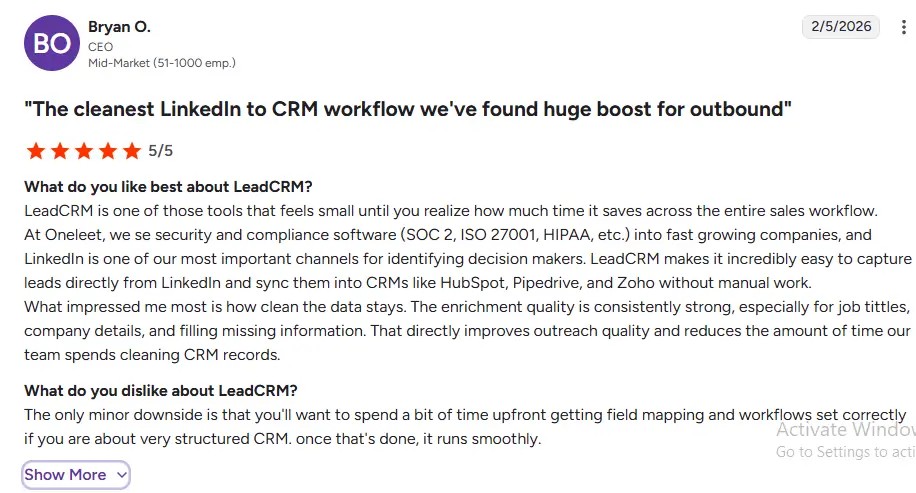
LeadCRM provides both — integrated natively with HubSpot, and as the only data enrichment tool in the GoHighLevel Marketplace. For GoHighLevel users specifically, this means LinkedIn-sourced contact enrichment, job change alerts, and intent signals inside GHL pipelines — a capability that previously didn’t exist in the platform at all. For HubSpot users, it layers intent intelligence and automated enrichment on top of the Sales Navigator integration that HubSpot’s native tools don’t surface.
👉 See how LeadCRM connects LinkedIn intelligence to both HubSpot and GoHighLevel →
Complete Feature Comparison
| Feature | HubSpot | GoHighLevel |
|---|---|---|
| Pricing model | Per-seat + per-contact tiers | Flat rate, unlimited users + contacts |
| Entry price | Free / $15–$20/seat | $97/month |
| Mid-tier price | $800–$1,300/month base | $297/month |
| Mandatory onboarding fee | $1,500–$7,000 | $0 |
| 10-user annual cost | ~$18,000–$24,000 | ~$3,564 |
| Startup discount cliff | 90% → 50% → 25% → full price | None |
| Annual renewal uplift | ~5% | None |
| UI / Ease of use | ⭐⭐⭐⭐⭐ Clean, intuitive | ⭐⭐⭐ Powerful, steep curve |
| Mobile app | ⭐⭐⭐⭐⭐ Fast, reliable | ⭐⭐⭐ Functional, less refined |
| Customer support | ⭐⭐⭐⭐⭐ Phone + chat, trained reps | ⭐⭐⭐ Scripted chat, community-reliant |
| Gmail sidebar + templates | ✅ Native, free plan | ❌ |
| Email deliverability setup | ✅ Managed out of the box | ⚠️ Manual DNS config required |
| Native SMS | ❌ Add-on only | ✅ Included from $97 |
| Missed-call text-back | ❌ | ✅ Native |
| Unified multi-channel inbox | ❌ Email-centric | ✅ SMS, email, DMs, calls |
| Funnel builder | Landing pages only | ✅ Full funnel builder |
| Course + community | ❌ | ✅ Native |
| Reputation management | ❌ | ✅ Native |
| Sub-accounts + Snapshots | ❌ | ✅ Unlimited at $297 |
| White-label / SaaS resell | ❌ | ✅ SaaS Pro $497 |
| Native integrations | 2,000+ | ~500 |
| Revenue attribution | ✅ Multi-touch, full-funnel | Basic, ad-centric |
| B2B reporting depth | ✅ Advanced | Moderate |
| AI tools | Breeze — mature, platform-wide | Growing — strong for automation |
| Inbound CMS / SEO blog | ✅ Best-in-class | ❌ Basic |
| LinkedIn enrichment | Via Sales Navigator (Starter+) | Via LeadCRM (GHL Marketplace only) |
The Verdict for Recruitment & Staffing Agencies
For recruitment and staffing agencies under 50 people, HubSpot wins on every dimension that matters for your current scale:
- Dual pipeline setup: buildable in HubSpot Professional in one to two days, running both client BD and candidate management cleanly
- Candidate nurture automation: native marketing automation included – job alert sequences, redeployment workflows, talent pool segmentation
- ATS integration: workable for major platforms (Bullhorn, Vincere, Greenhouse) through Marketplace connectors and Zapier
- LinkedIn Sales Navigator: embedded integration for client BD pipeline at Professional tier
- Breeze AI: Copilot and Prospecting Agent included with no extra cost
- 3-year TCO (15 people): $55K–$80K vs $280K–$470K for Salesforce
- No dedicated admin required
Salesforce is the right choice when:
- You’re a 50+ person staffing enterprise with complex multi-practice, multi-territory operations
- You need Bullhorn for Salesforce – the most integrated ATS+CRM combination for large staffing firms
- You have dedicated Salesforce RevOps and complex commission structures requiring Opportunity Splits
- Your enterprise clients require Salesforce integration for vendor management systems
Whichever platform you choose, the double funnel only performs as well as the data inside it. Stale candidate records, outdated client contacts, and no visibility into which companies are actively growing right now are what limits your placement rate. LeadCRM solves all three – for both HubSpot and Salesforce users.
Quick Reference: HubSpot vs Salesforce for Recruitment Agencies
| Feature | HubSpot | Salesforce |
|---|---|---|
| Best for | Agencies under 50 people | Large staffing enterprises 50+ |
| Free plan | Yes | No |
| Dual pipeline (candidate + client) | Native – configurable in hours | Configurable with admin |
| Candidate nurture automation | Native – Marketing Hub included | Requires Marketing Cloud add-on |
| ATS integration | Vincere, Greenhouse, Bullhorn (via connectors) | Bullhorn for Salesforce (native), AppExchange |
| LinkedIn Sales Navigator | Professional+ | Enterprise+ |
| LinkedIn Recruiter integration | Via ATS (not direct CRM) | Via ATS (not direct CRM) |
| Commission tracking | Custom properties (basic) | Opportunity Splits (advanced) |
| AI tools | Breeze – included | Agentforce – +$125/user/mo |
| 3-year TCO (15 people) | ~$55K–$80K | ~$280K–$470K |
| Native data enrichment | Limited | Limited |
| Native intent data | ❌ | ❌ |
| With LeadCRM | ✅ Enriched + Intent-aware | ✅ Enriched + Intent-aware |
Who Should Choose HubSpot
- Your team is 1–3 people on the startup program — $80/month in Year 1 is excellent value. Model Years 2–4 before building deep integrations.
- You’re running a content-first B2B inbound strategy — HubSpot’s CMS, SEO tools, and multi-touch attribution have no GoHighLevel equivalent.
- Your team lives in Gmail — the sidebar, templates, and real-time open tracking inside your inbox are daily workflow tools GoHighLevel cannot replicate.
- Non-technical teams where adoption is the primary risk — HubSpot’s UI is learnable in hours, not weeks.
- You need enterprise support — phone and chat with trained, technically capable reps at Professional/Enterprise.
- You need 2,000+ integrations or complex enterprise tech stack connections.
- Your sales team is field-based and relies on a fast, reliable mobile app.
Who Should Choose GoHighLevel
- Your team is 5 or more and growing — the per-seat math is too lopsided to justify HubSpot past this point without enterprise-specific requirements.
- You’re a digital marketing agency managing multiple client accounts — sub-accounts, Snapshots, flat pricing, and white-label are built for your model.
- You’re a local service business — SMS, missed-call text-back, appointment automation, and review management are native and cheap.
- You need SMS as a core workflow — not an add-on, natively integrated with pipeline automation from day one.
- You want to consolidate your tool stack — GHL replaces CRM, email, SMS, scheduling, funnels, review management, and course platform at $97–$297/month.
- You want cost predictability — $297/month with no cliff, no renewal uplift, no per-seat surprises.
- You’re a coach or course creator — GHL replaces Kajabi, Calendly, and an email platform in one subscription.
One non-negotiable regardless of which you choose: configure email DNS records (SPF, DKIM, DMARC) before sending any bulk email in GoHighLevel. This is a 2–4 hour setup that determines whether your campaigns reach inboxes or spam folders.
Frequently Asked Questions
Is GoHighLevel cheaper than HubSpot?
For most businesses with more than 3–4 team members, yes — significantly. GoHighLevel Unlimited at $297/month covers unlimited users and contacts. HubSpot Professional starts at $800–$1,300/month base for 3–5 seats, plus $50–$100/month per additional user, plus mandatory onboarding fees of $1,500–$7,000 before your first bill.
What is the HubSpot startup discount and what happens after Year 1?
HubSpot for Startups offers 90% off Year 1, 50% off Year 2, and 25% off Year 3. Professional that costs ~$80/month in Year 1 costs ~$400/month in Year 2 and ~$800–$1,300/month by Year 4, plus a 5% annual renewal uplift from that point forward.
Does HubSpot have a free plan?
Yes — functional for solo users and very early-stage teams up to 2 users and 1,000 contacts. GoHighLevel offers a 14-day free trial, no free plan.
Is GoHighLevel's support good?
It’s inconsistent. Live chat is 24/7 but frequently scripted. Complex workflow issues can take 24–48 hours to resolve and often require the user to escalate through community forums, Facebook groups, or YouTube tutorials rather than official channels. HubSpot’s Professional and Enterprise support — phone and trained chat agents — is significantly more reliable for complex technical issues.
Does GoHighLevel work for B2B businesses?
Yes, particularly for SMBs under 20 people. Pipeline management, deal tracking, sequences, and follow-up automation all work well. The gap vs HubSpot is in multi-touch revenue attribution and enterprise reporting depth for complex, long-cycle B2B deals.
Can GoHighLevel replace Calendly and a CRM simultaneously?
Yes. GoHighLevel Starter at $97/month includes CRM, calendar booking, email, SMS, funnels, forms, and review management. If you’re paying separately for Calendly, Mailchimp, and a basic CRM, one GoHighLevel subscription replaces all three.
Does GoHighLevel integrate with LinkedIn?
Not natively. LeadCRM — the only enrichment tool in the GoHighLevel Marketplace — connects GoHighLevel contact records to LinkedIn data, job change alerts, and intent signals. For HubSpot users, LeadCRM provides the same capability alongside Sales Navigator.