Get your Black Friday deal today! Avail now! 💥

How to Use Guided Execution in HubSpot

Guided execution in HubSpot Sales Hub is designed to help sales representatives focus on the right tasks at the right time. Inside the Sales Workspace, HubSpot analyzes CRM activity and suggests actions that help move deals forward. These suggestions can include following up with prospects, responding to email engagement, completing tasks, or updating deal information. Instead of reviewing multiple records manually, the system highlights activities that require immediate attention.

Table of Contents

Guided execution helps sales teams stay productive and ensures that important opportunities are not overlooked.

This guide explains how to access guided execution inside HubSpot and how to use it effectively in your daily sales workflow.

Step 1: Log in to Your HubSpot Account

Start by signing in to your HubSpot account.

  • Open your browser and visit hubspot.com.
  • Click Log In in the top navigation.
  • Enter your registered email address and password.
  • After logging in, you will arrive at the HubSpot dashboard.
  • From the dashboard, you can access all CRM and sales tools.

Step 2: Open the Sales Workspace

Guided execution is available inside the Sales Workspace.

To access it:

  • Navigate to the top navigation bar.
  • Click Sales.
  • Select Sales Workspace from the dropdown menu.

The workspace organizes sales activities including tasks, sequences, and recommended actions.

Step 3: Locate the Guided Execution Section

Inside the Sales Workspace, you will find the Guided Execution panel.

This section displays recommended actions based on CRM data and recent prospective activity.

Examples of recommended actions may include:

  • Follow up with a lead who recently opened an email
  • Contact a prospect who scheduled a meeting
  • Update a deal that has not progressed recently
  • Complete overdue tasks
  • Review of new contact engagement

These suggestions help representatives identify which actions should be completed next.

Step 4: Review Recommended Actions

Each recommendation inside the guided execution panel contains information about the contact or deal that requires attention.

Reviewing a recommendation:
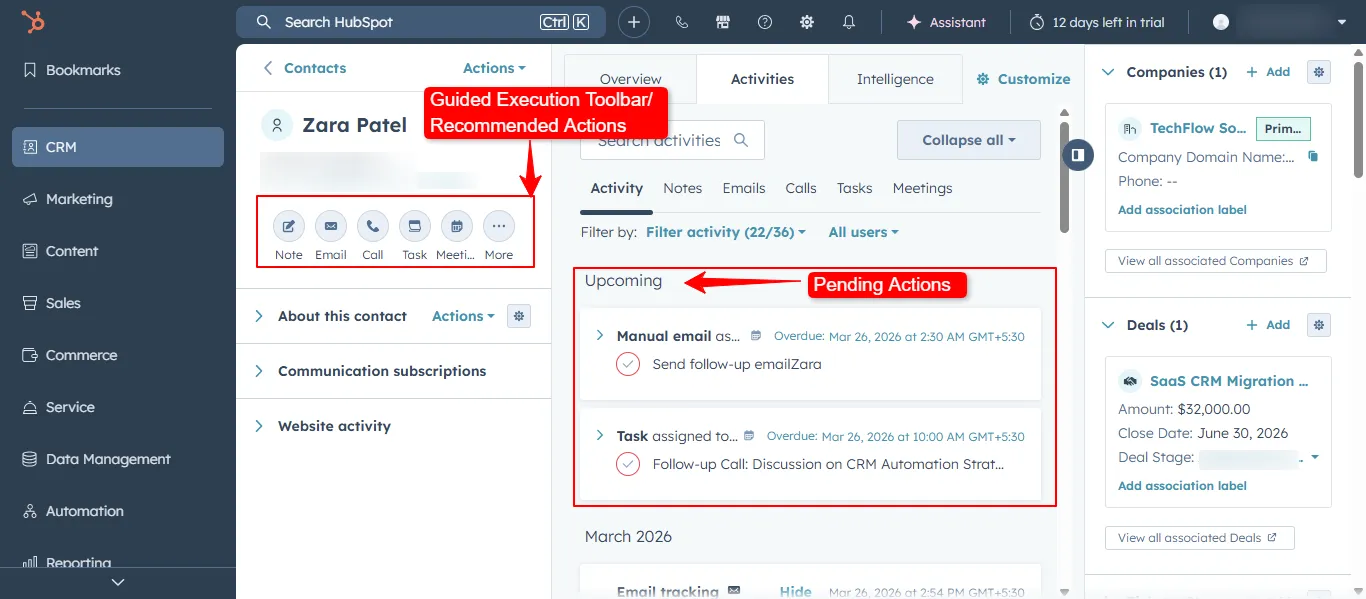
  • Click on the suggested action.
  • HubSpot will open associated contact, company, or deal record.
  • Review the details and activity history.
  • Take the recommended action such as sending an email or making a call.

This process helps sales representatives respond quickly to prospective activity.

Step 5: Complete Actions Directly from the Workspace

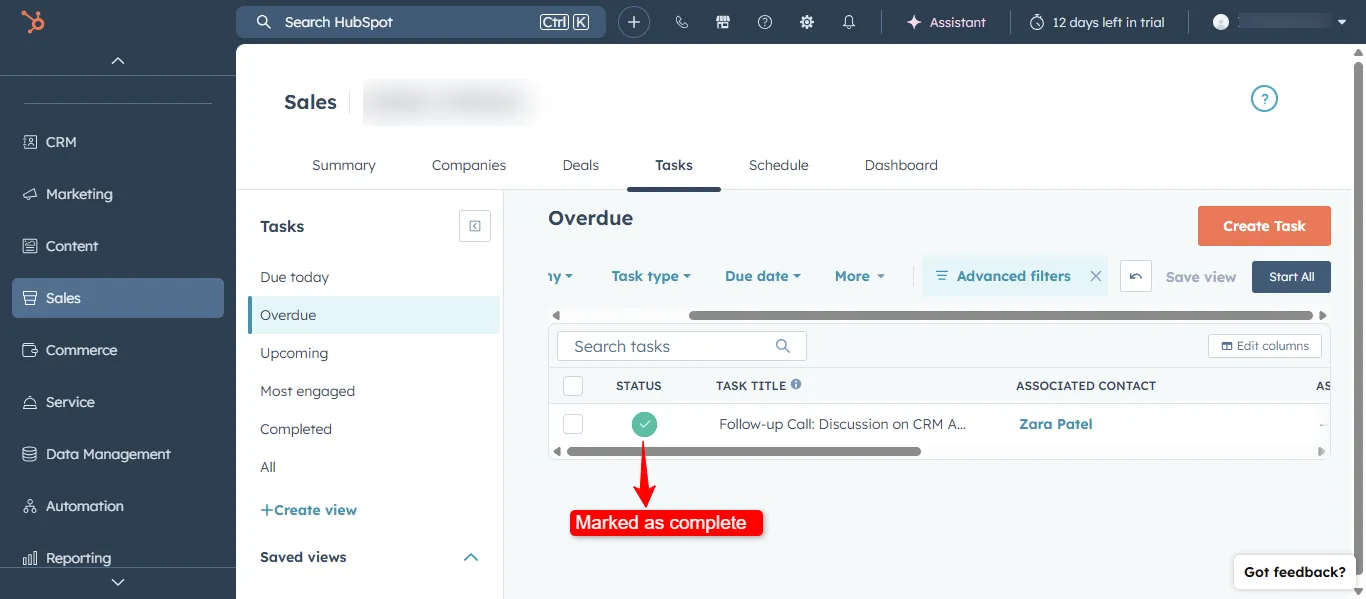
HubSpot allows you to complete many actions directly within the guided execution interface.

Common actions include:
  • Sending follow up emails
  • Logging calls
  • Scheduling meetings
  • Updating deal stages
  • Completing tasks

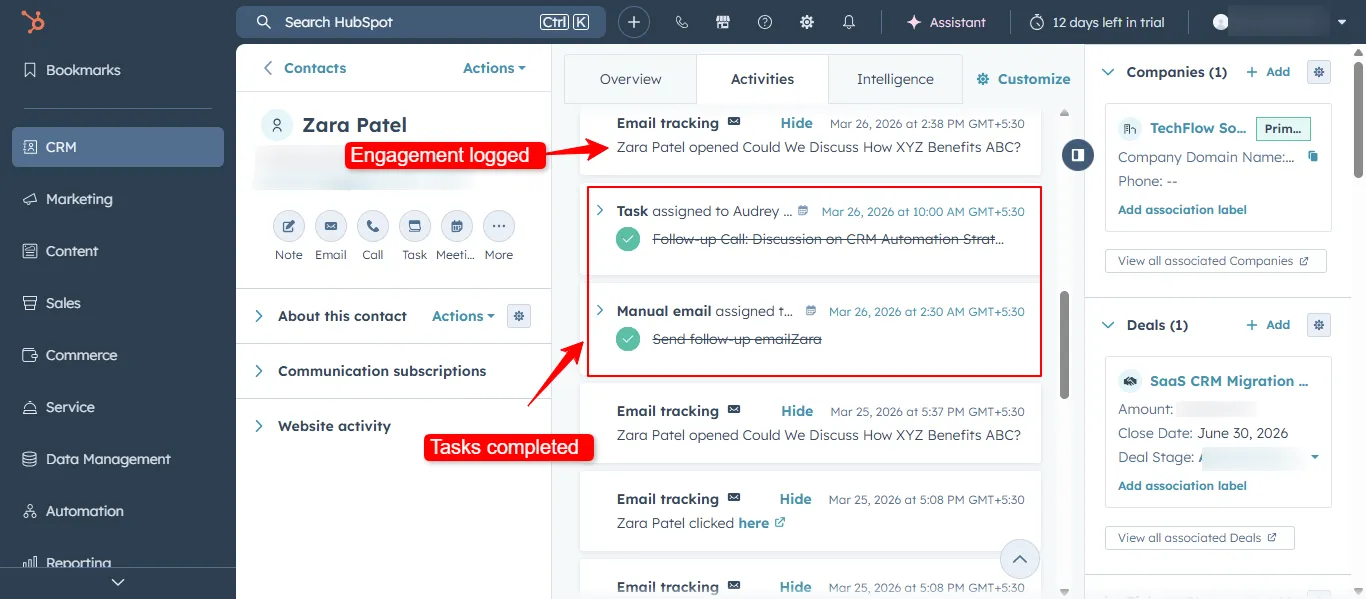
Once the action is completed, HubSpot automatically removes it from the guided execution list and updates the CRM record.

This ensures that the workspace always displays the next most relevant activity.

Step 6: Use Guided Execution to Prioritize Daily Work

Guided execution helps sales teams stay organized by prioritizing important tasks.

Instead of reviewing hundreds of contacts or deals, representatives can focus on actions that HubSpot identifies as high priority.

Typical daily workflow using guided execution may include:

  • Open the Sales Workspace at the start of the day.
  • Review recommended actions.
  • Complete follow ups and outreach tasks.
  • Update deal records after conversations.
  • Continue working through suggested actions until the list is complete.

This approach keeps sales activity structured and consistent.

Best Practices for Using Guided Execution

To get the most value from guided execution in HubSpot:

  • Check the Sales Workspace regularly throughout the day
  • Complete recommended actions quickly when prospects engage
  • Keep contact and deal records updated so recommendations remain accurate
  • Combine guided execution with task queues and sequences
  • Use workflows to automate follow up actions

Conclusion

Guided execution in HubSpot helps sales teams stay focused on the activities that matter most. By analyzing CRM data and prospect engagement, the system highlights actions that move deals forward.

Instead of manually reviewing contacts and deals, representatives can rely on the Sales Workspace to guide their daily workflow. This improves response time, ensures consistent follow ups, and helps teams maintain an organized sales process inside HubSpot.