LinkedIn prospecting can involve repetitive profile research, contact capture, and CRM updates. The right automation tool depends on which of those tasks is slowing your team down. Manual copying between profiles and CRM records adds friction and can leave conversation context or follow-up details out of date. Meanwhile, outbound teams constantly worry about profile security because blunt automation bots blast out repetitive connection requests until LinkedIn restricts their accounts.
LinkedIn automation tools exist to solve these operational bottlenecks by putting repetitive prospecting, enrichment, and data-entry tasks on autopilot. However, the software landscape has shifted dramatically in 2026. Blunt mass-messaging spammers have been replaced by intelligent multichannel sequencers, autonomous research agents, and dedicated workflow connectors that link LinkedIn directly to your core CRM.
In this guide, we evaluate and compare the 30 top LinkedIn automation platforms across their core outbound workflows, from cloud sequencers and Sales Navigator scrapers to real-time CRM bridges. Some tools focus on outreach sequences; others focus on contact enrichment, Sales Navigator exports, or syncing LinkedIn activity into a CRM.
Whether your priority is autonomous cloud outreach, verified waterfall contact enrichment, clean Sales Navigator list extraction, or one-click CRM synchronization, this guide compares 30 LinkedIn automation tools by workflow and fit.
How We Evaluated & Compared These 30 LinkedIn Automation Tools
To produce a transparent, practical guide rather than generic vendor marketing, we applied a standardized evaluation methodology across all 30 platforms:
- Evaluation Scope: 30 commercial LinkedIn automation tools across 6 operational categories.
- Platform Compatibility Analyzed: Integration across free LinkedIn accounts, LinkedIn Premium Career/Business, and LinkedIn Sales Navigator subscriptions.
- CRM Ecosystems Analyzed: Native workflows and data sync across HubSpot, Salesforce, Pipedrive, Zoho CRM, Close, GoHighLevel, and Google Sheets.
- 5 Core Evaluation Criteria & Weightings: 1. CRM Integration Depth & 2-Way Sync (25%): Ability to capture complete prospect profiles, log messages, sync deal stages, map custom fields, and eliminate duplicate records without third-party integration tools. 2. Data Enrichment & Verification Quality (25%): Accuracy of business email and mobile phone discovery, use of multi-vendor waterfall verification versus single-source scrapers, and presence of automated credit refund policies for unverified records. 3. Safety Architecture & Platform Risk Controls (20%): Cloud dedicated IP proxies, account rotation capabilities, human-like delay randomization, session cookie management, and compliance with LinkedIn’s weekly invitation limits. 4. Workflow Flexibility & Sequencing Capabilities (15%): Multichannel touchpoints (combining LinkedIn and cold email), autonomous AI research agents, dynamic conditional branching, and bulk Sales Navigator lead export capacity. 5. Pricing Transparency & Commercial Value (15%): Starting prices, per-seat versus pooled sender economics, credit expiration terms, and availability of free tiers or trials.
Transparency & Publisher Disclosure: LeadCRM is the publisher of this guide. We have included our own product and clearly labeled it as a category contender alongside 29 third-party tools. The entries compare stated capabilities and workflow fit. G2 product pages are linked for readers who want to review customer feedback directly. LeadCRM is evaluated strictly as a contender for the Best LinkedIn-to-CRM Connector category rather than an overall winner across every outbound discipline. No vendor paid for inclusion, ranking, or placement in this guide.
Best LinkedIn Automation Tools at a Glance (2026 Category Winners)
For teams seeking immediate recommendations based on their specific operational need, the table below highlights our verified category winners across the 2026 landscape:
| Category / Operational Need | Winning Tool | Why It Won | Starting Price | Primary CRM Compatibility |
|---|---|---|---|---|
| Best LinkedIn CRM Integration Connector | LeadCRM | Direct 1-click sync to HubSpot, Salesforce, Pipedrive, Zoho CRM, Close & GoHighLevel; bulk Sales Navigator exports (up to 600/day); real-time multi-vendor waterfall data enrichment with automatic credit refunds | From $29.95/mo (Free tier available) | HubSpot, Pipedrive, Salesforce, Zoho CRM, Close, GoHighLevel, Google Sheets |
| Best Multichannel Cloud Outreach | LinkedFusion | Cloud sequencing with dedicated IP; email + LinkedIn sender rotation; built-in email enrichment; real-time buyer intent data (hiring/funding) & autonomous AI research agents | From $65.95/mo | HubSpot, Salesforce, Pipedrive, Zapier, Webhooks |
| Best Agency Multi-Account Outreach | HeyReach | Centralized sender pooling; dynamic lead re-routing when weekly limits are hit; unified multi-inbox management | From $79/sender/mo | HubSpot, Pipedrive, Webhooks, Zapier |
| Best Clean Sales Navigator Extractor | Evaboot | Specialized algorithm removes false positives, cleans names and emojis, and verifies business emails into clean spreadsheets | Free tier; Paid from $19/mo | CSV Export, Webhooks |
| Best Live Contact Enrichment | Wiza | Real-time SMTP email verification and direct mobile phone enrichment directly from live Sales Navigator searches | Pay-as-you-go or from $49/mo | HubSpot, Salesforce, Pipedrive, Outreach |
| Best Desktop & Local Automation | Linked Helper 2 | Deep sequence customization inside an isolated desktop app; embedded browser simulation mimicking human clicks at low monthly cost | From $15/mo | HubSpot, Pipedrive, Zapier, Webhooks |
| Best Content-Led Inbound Growth | Taplio | AI content generation, viral post curation, scheduled publishing, and inbound relationship management from post commenters | From $39/mo | CSV Export, Zapier |
Part 1: Strategic Framing & The 4 Architectural Models of LinkedIn Automation
Before selecting a vendor, it is essential to understand the technical architecture behind each tool. In practice, choosing the wrong software model almost always resulted in messy duplicate CRM records, fragmented data silos, or unnecessary profile security flags.
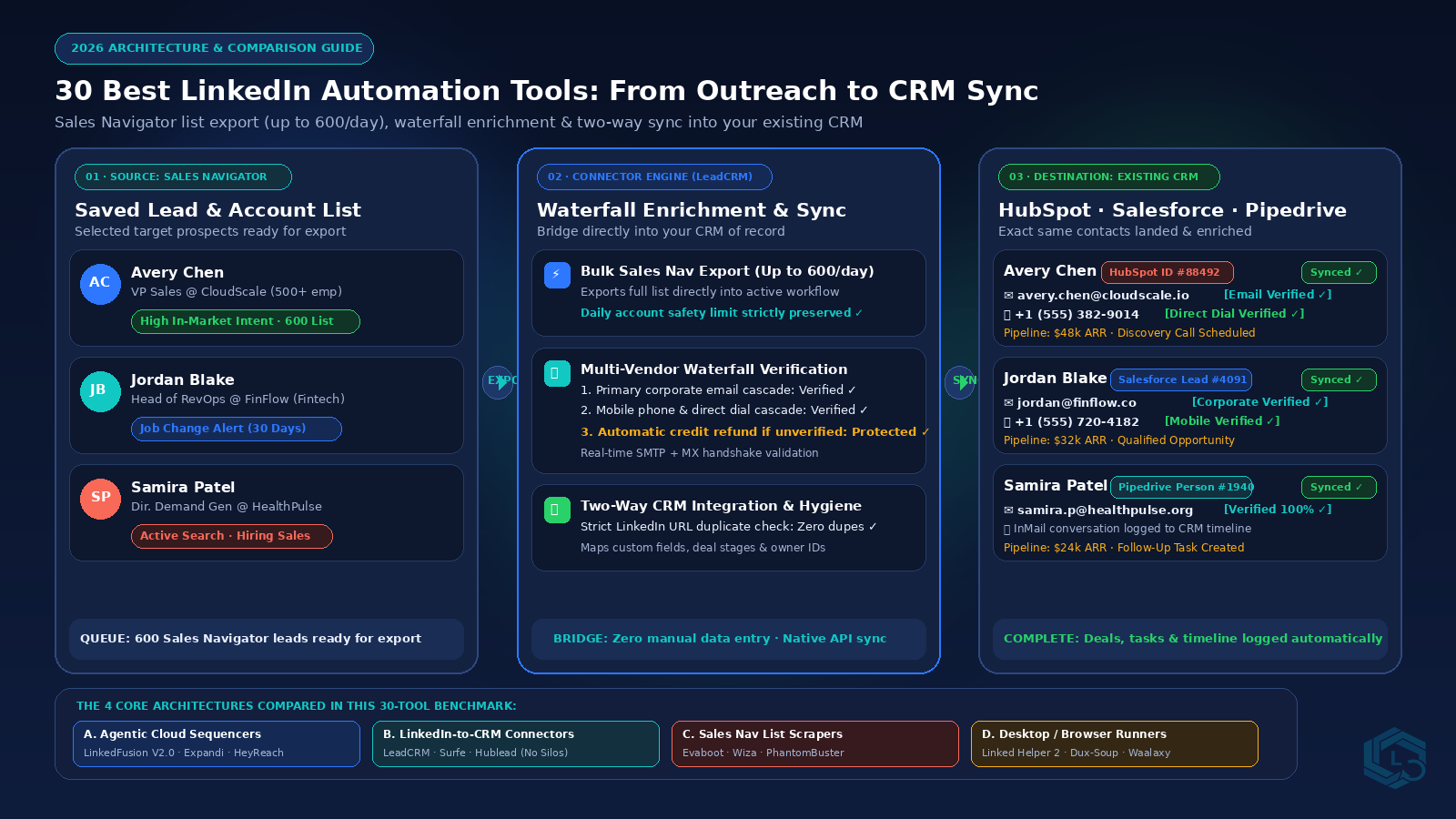
Across the 30 tools evaluated, every platform falls into one of four operational models:
- Model A: Autonomous Cloud Sequencers & Multichannel Platforms (e.g., LinkedFusion, Expandi, HeyReach): These platforms run outreach cadences from remote cloud servers using dedicated IP proxies, account rotation, and automated warmup. Because they operate in the cloud, campaigns run 24/7 without requiring your personal workstation to stay open. Modern category leaders like LinkedFusion now integrate multichannel email rotation, autonomous AI research agents, and native CRM integrations alongside custom webhooks.
- Model B: LinkedIn-to-CRM Workflow Bridges (e.g., LeadCRM, Surfe, Hublead): These platforms provide direct LinkedIn CRM integration, turning your browser into a live bridge between LinkedIn and your system of record (HubSpot, Salesforce, Pipedrive, Zoho CRM, Close, or GoHighLevel). Instead of blasting cold messages, they let sales reps prospect naturally, view bi-directional prospect records through a native CRM data overlay, enrich corporate emails and direct dials through multi-provider waterfall data enrichment, and sync deals, notes, and chat histories in one click.
- Model C: Sales Navigator List Extractors & Cleaners (e.g., Evaboot, Wiza): Dedicated scrapers operate in read-only mode to pull Sales Navigator search results into clean spreadsheets. They strip out search false positives, fix formatting mistakes, and append business emails, making them ideal for building clean target lists before launching a campaign.
- Model D: Local Desktop & Chrome Extension Runners (e.g., Linked Helper 2, Dux-Soup): These tools run automation scripts directly from your local computer and IP address. While budget-friendly for solo operators, they require your machine to stay awake during execution and consume local CPU resources.
Part 2: Quick Comparison Matrix (The 30 Tools at a Glance)
The matrix below compares all 30 evaluated tools across deployment architecture, primary CRM destinations, enrichment methodology, account access model, starting price, and verified G2 review destinations:
| Tool | Category | Deployment | Primary CRM Destinations | Enrichment Type | Access / Safety Model | Starting Price | G2 Product Pages |
|---|---|---|---|---|---|---|---|
| LinkedFusion | Multichannel Cloud Outreach | Cloud-based | Native Sync (HubSpot, Salesforce, Pipedrive, etc.) + Webhooks / Zapier | Built-in Enrichment + Intent, Hiring, Funding & Job-Change Data | Dedicated Cloud IP + Warmup & Account/Inbox Rotation | From $65.95/mo | Read G2 Reviews |
| LeadCRM | LinkedIn CRM Integration | Chrome Extension + Cloud | HubSpot, Pipedrive, Salesforce, Zoho CRM, Close, GoHighLevel, Sheets | Waterfall Data Enrichment | Assistive Browser Bridge | From $29.95/mo | Read G2 Reviews |
| Evaboot | Sales Nav Scraper & Cleaning | Cloud / Chrome Extension | CSV Export, Webhooks | Single-Source Email | Read-Only Scraper | Free; Paid from $19/mo | Read G2 Reviews |
| Expandi | Omnichannel Cloud Sequencer | Cloud-based | HubSpot, Zapier, Make, Webhooks | Single-Source / Webhooks | Cloud Dedicated IP | From $99/mo per seat | Read G2 Reviews |
| HeyReach | Agency Multi-Account Outreach | Cloud-based | HubSpot, Pipedrive, Webhooks, Zapier | Webhooks / CSV | Cloud Multi-Sender | From $79/sender/mo | Read G2 Reviews |
| Surfe | LinkedIn-to-CRM Bridge | Chrome Extension | HubSpot, Salesforce, Pipedrive, Copper | Waterfall Enrichment | DOM Injection Overlay | From $39/user/mo | Read G2 Reviews |
| Hublead | HubSpot-Dedicated Extension | Chrome Extension | HubSpot (Dedicated) | Single-Source Email | DOM Injection Overlay | From $24/user/mo | Read G2 Reviews |
| Waalaxy | Multichannel Outreach Extension | Chrome Extension | HubSpot, Pipedrive, Zapier, Webhooks | Dropcontact Waterfall | Browser Script Execution | Free; Paid from €56/mo | Read G2 Reviews |
| Dripify | Drip Campaign Sequencer | Cloud-based | HubSpot, Zapier, Webhooks | Limited Native Scrape | Cloud Dedicated IP | From $39/user/mo | Read G2 Reviews |
| PhantomBuster | Workflow Scraping Engine | Cloud-based | HubSpot, Pipedrive, Zapier, CSV | Dropcontact / Hunter | Cloud Session Cookie | From $56/mo | Read G2 Reviews |
| Linked Helper 2 | Desktop Automation App | Desktop App (Mac, Windows, Linux) | HubSpot, Pipedrive, Zapier, Webhooks | External API Integrations | Local Browser Emulation | From $15/mo | Read G2 Reviews |
| Lemlist | Multichannel Sales Engagement | Cloud-based | HubSpot, Salesforce, Pipedrive, Zapier | Waterfall (Email Finder) | Cloud + Extension | From $39/seat/mo | Read G2 Reviews |
| Zopto | B2B Cloud Outreach Suite | Cloud-based | HubSpot, Salesforce, Pipedrive, Zapier | Single-Source / Partners | Cloud Dedicated IP | From $197/mo | Read G2 Reviews |
| Reply.io | AI Sales Engagement Platform | Cloud + Chrome Extension | Salesforce, HubSpot, Pipedrive, Copper | Reply Data Engine | Cloud Multi-Channel | From $49/user/mo | Read G2 Reviews |
| Meet Alfred | Multichannel Automator | Cloud-based | HubSpot, Salesforce, Webhooks | Single-Source Scrape | Cloud Account Login | From $39/mo | Read G2 Reviews |
| Dux-Soup | Browser-Based Outreach Extension | Chrome Extension | HubSpot, Pipedrive, Zapier, Make | LeadEnforce Integration | Browser DOM Scripting | From $11.25/mo | Read G2 Reviews |
| Octopus CRM | Entry-Level Prospecting Funnel | Chrome Extension | HubSpot, Zapier, CSV | None / Manual CSV | Browser Script Execution | From $6.99/mo | Read G2 Reviews |
| Salesflow | Agency-Grade Cloud Automation | Cloud-based | HubSpot, Salesforce, Pipedrive, Zapier | Single-Source Scrape | Cloud Dedicated Proxy | From $99/user/mo | Read G2 Reviews |
| We-Connect | Cloud Prospecting Suite | Cloud-based | HubSpot, Zapier, Webhooks | CSV Import / Export | Cloud Dedicated IP | From $49/mo | Read G2 Reviews |
| Skylead | Smart Sequence Multichannel Tool | Cloud-based | HubSpot, Salesforce, Zapier, Webhooks | Integrated Email Discovery | Cloud Dedicated IP | From $100/seat/mo | Read G2 Reviews |
| Taplio | Content & Inbound Automation | Web App + Chrome Extension | CSV Export, Zapier | None (Content / Inbound) | API & Session Cookie | From $39/mo | Read G2 Reviews |
| Lempod | Engagement Pod Automation | Chrome Extension | None | None | Browser Extension Action | From $9.99/pod/mo | Read G2 Reviews |
| Wiza | Sales Nav Data Extraction | Web App + Chrome Extension | HubSpot, Salesforce, Pipedrive, Outreach | Live Waterfall Verify | Read-Only Scraper | Pay-as-you-go / $49/mo | Read G2 Reviews |
| Kaspr | B2B Direct Contact Extractor | Chrome Extension | HubSpot, Salesforce, Pipedrive, Lemlist | Direct Carrier Cascade | Extension DOM Read | Free; Paid from €45/mo | Read G2 Reviews |
| Lusha | Enterprise Contact Intelligence | Chrome Extension + Platform | Salesforce, HubSpot, Pipedrive, Zoho | Proprietary Database | Extension DOM Read | Free; Paid from $36/user/mo | Read G2 Reviews |
| LaGrowthMachine | Advanced Multichannel Workflows | Cloud-based | HubSpot, Pipedrive, Salesforce, Webhooks | Dropcontact Integration | Cloud Identity Rotation | From €50/mo | Read G2 Reviews |
| LiProspect | Humanized Cloud Automation | Cloud-based | Webhook, Zapier | Single-Source Email | Mobile 4G Proxy Cloud | From $49.99/mo | Read G2 Reviews |
| Captain Data | No-Code Data Operations & Scraping | Cloud-based | HubSpot, Salesforce, Pipedrive, Snowflake | 30+ Data Engine Connectors | Cloud Headless Runner | From $399/mo | Read G2 Reviews |
| LeadConnect | Lightweight Chrome Sequencer | Chrome Extension | HubSpot, Pipedrive, Webhooks | None / External | Browser DOM Scripting | From $25.95/mo | Read G2 Reviews |
| Datagma | Real-Time Intent & Enrichment | API + Chrome Extension | HubSpot, Salesforce, Pipedrive, Lemlist | Multi-Source Job Change | API & Extension Overlay | From $29/mo | Read G2 Reviews |
Part 3: In-Depth Breakdown of the 30 Tools (Grouped by Category)
Below is our comprehensive technical evaluation of all 30 platforms, grouped into six core operational categories to help you select the exact software for your revenue workflow.
Category 1: LinkedIn-to-CRM Sync & Live Enrichment
This category represents platforms designed specifically to eliminate manual data entry by connecting LinkedIn directly into your primary CRM with real-time contact enrichment.
1. LeadCRM (Winner: Best LinkedIn CRM Integration Connector & Live Waterfall Data Enrichment)
- Best For: Sales reps, RevOps teams, and outbound pros wanting 1-click CRM sync, waterfall contact enrichment, and bulk Sales Navigator exports into HubSpot, Salesforce, Pipedrive, Zoho CRM, Close, or GoHighLevel.
- Core Architecture & Mechanism: LeadCRM operates as an assistive browser bridge paired with cloud-managed waterfall data enrichment. When a sales rep browses LinkedIn or Sales Navigator, LeadCRM injects a real-time CRM data overlay that interacts directly with your CRM via native APIs. Reps see existing deal stages, past touchpoints, and missing contact fields directly on prospect profiles without switching tabs. It is not an outreach spam bot; instead, it is a dedicated connector that ensures sales activity lands directly in your system of record.
- CRM & Workflow Integration: Native bi-directional LinkedIn CRM integration with HubSpot, Pipedrive, Salesforce, Zoho CRM, Close, GoHighLevel, and Google Sheets. Reps can sync complete contact profiles, company records, custom property fields, deal stages, and LinkedIn message histories. Teams can also export leads from Sales Navigator in bulk, up to 600 profiles per day on Ultimate, and sync those records directly into their CRM without repetitive manual copying.
- Pricing & Credit Model: Professional starts at $29.95/month, Grow at $49.95/month, and Ultimate at $69.95/month. Annual Grow and Ultimate plans include unlimited syncs. Unverified enrichment credits are automatically refunded through our waterfall data enrichment cascade to ensure zero wasted budget.
- Strengths & Technical Limitations: Leading data hygiene with strict URL duplicate detection, automatic credit refunds, person-level intent data to prioritize active prospects, and native task synchronization. Built for sales teams that prioritize CRM integrity over blind mass messaging. Not intended for autonomous cold outreach drips; teams needing automated message sequences should pair it with a dedicated cloud sequencer like LinkedFusion.
- G2 Product Page: LeadCRM on G2
- Operational & Workflow Profile: The entry above summarizes the tool’s stated deployment model, integrations, pricing, and workflow fit. Check the linked G2 product page for current customer reviews.
2. Surfe
- Best For: Sales teams wanting basic CRM synchronization and side-panel field edits directly within LinkedIn.
- Core Architecture & Mechanism: Surfe embeds a persistent side panel inside LinkedIn that pulls CRM contact records into the browser view, allowing reps to edit properties and manage deals.
- CRM & Workflow Integration: Integrates with HubSpot, Salesforce, Pipedrive, and Copper. Supports basic field mapping and message synchronization into CRM contact activity logs.
- Pricing & Credit Model: Tiered pricing starting from $39/user/month, with enrichment credits billed separately at higher monthly rates.
- Strengths & Technical Limitations: Clean side-panel UI and solid CRM connections. Limitations include higher pricing tiers for enterprise enrichment credits and occasional extension latency on high-volume lists. Outbound teams seeking more flexible pricing, automated credit refunds for unverified contacts, and higher-volume list exports frequently consider LeadCRM as a top Surfe alternative.
- G2 Product Page: Surfe on G2
- Operational & Workflow Profile: The entry above summarizes the tool’s stated deployment model, integrations, pricing, and workflow fit. Check the linked G2 product page for current customer reviews.
3. Hublead
- Best For: Dedicated HubSpot sales organizations seeking message sync and contact creation.
- Core Architecture & Mechanism: Hublead is a specialized Chrome extension built exclusively for HubSpot ecosystems, connecting profile visits and messages directly to HubSpot records.
- CRM & Workflow Integration: Dedicated strictly to HubSpot. It logs LinkedIn messages into contact timelines and maps basic contact fields.
- Pricing & Credit Model: Starting from $24/user/month. Advanced features like bulk exports are restricted to higher tier plans.
- Strengths & Technical Limitations: Deep native alignment for pure HubSpot teams. Limitations include zero support for Salesforce, Pipedrive, or other CRMs, and limited native multi-vendor waterfall enrichment. Sales organizations needing multi-CRM compatibility, person-level intent data, or broader data verification often evaluate a dedicated Hublead alternative like LeadCRM.
- G2 Product Page: Hublead on G2
- Operational & Workflow Profile: The entry above summarizes the tool’s stated deployment model, integrations, pricing, and workflow fit. Check the linked G2 product page for current customer reviews.
Category 2: Agentic & Cloud Outreach Engines
Cloud sequencers run outreach campaigns from remote cloud servers using dedicated IP proxies, account rotation, and automated warmup.
4. LinkedFusion (Winner: Best Multichannel Cloud Outreach)
- Best For: Sales teams and agencies needing an all-in-one multichannel (LinkedIn + cold email) outreach platform with account rotation, AI personalization, and deep intent signals.
- Core Architecture & Mechanism: Across modern cloud sequencers, LinkedFusion stands out as the clear winner in the cloud outreach category. With over 8 years of operational track record in outbound automation, it has evolved well beyond basic linear drip sequences into a complete multichannel platform. To navigate LinkedIn’s strict limit of roughly 100 to 200 invites per week, LinkedFusion pairs LinkedIn account rotation (pooling sender accounts for volume) with email inbox rotation, automated warmup services, and strict safety controls. Each account receives a dedicated local cloud IP to support consistent account operations.
- CRM & Workflow Integration: Provides native integrations across major CRMs including HubSpot, Salesforce, and Pipedrive without requiring Zapier, while preserving webhooks and Zapier connectors for custom stacks. Includes a 1-click “job-change champion” workflow that tracks past CRM buyers when they move to new companies, automatically triggering new outbound sequences.
- Autonomous AI Agents & Intent Data: Features autonomous research agents that analyze both your company profile and each prospect’s live LinkedIn profile to draft hyper-personalized messages. Built-in buyer intent data tracks hiring trends, funding signals, and company growth indicators so teams can target accounts actively looking for solutions.
- Pricing & Credit Model: Plans start from $65.95/month. Built-in email enrichment and intent monitoring are integrated into the platform.
- Strengths & Technical Limitations: Comprehensive multichannel sequencing, dedicated IPs, 8-year market tenure, and intelligent sender rotation. More complex interface than lightweight extensions, requiring initial setup for DNS and email warmup.
- G2 Product Page: LinkedFusion on G2
- Operational & Workflow Profile: The entry above summarizes the tool’s stated deployment model, integrations, pricing, and workflow fit. Check the linked G2 product page for current customer reviews.
5. Expandi
- Best For: Sales teams wanting reliable cloud-hosted LinkedIn messaging and email outreach sequences.
- Core Architecture & Mechanism: Expandi runs automated LinkedIn sequences and email steps on dedicated cloud servers with localized IP addresses, operating 24/7 without needing your workstation active.
- CRM & Workflow Integration: Integrates with HubSpot, Zapier, Make, and webhooks to pass campaign events downstream.
- Pricing & Credit Model: Fixed pricing at $99/seat/month.
- Strengths & Technical Limitations: Visual sequence builder, smart delays, and GIF personalization. Relatively high per-seat entry price for small teams.
- G2 Product Page: Expandi on G2
- Operational & Workflow Profile: The entry above summarizes the tool’s stated deployment model, integrations, pricing, and workflow fit. Check the linked G2 product page for current customer reviews.
6. HeyReach (Winner: Best Agency Multi-Account Outreach)
- Best For: Agencies and enterprise sales teams running outreach across dozens of LinkedIn senders.
- Core Architecture & Mechanism: Cloud-based sender pooling platform that connects multiple LinkedIn accounts into unified campaigns. If one account reaches weekly connection caps, pending tasks are dynamically reallocated across the sender pool.
- CRM & Workflow Integration: Connects to HubSpot, Pipedrive, and webhook automations, with unified multi-inbox reply management.
- Pricing & Credit Model: Plans start from $79/sender/month.
- Strengths & Technical Limitations: The benchmark for multi-account agency scaling. Requires multiple active LinkedIn accounts to realize full economic value.
- G2 Product Page: HeyReach on G2
- Operational & Workflow Profile: The entry above summarizes the tool’s stated deployment model, integrations, pricing, and workflow fit. Check the linked G2 product page for current customer reviews.
7. Salesflow
- Best For: B2B sales agencies needing white-label reporting and multi-client campaign control.
- Core Architecture & Mechanism: Cloud automation engine with dedicated IP addresses and centralized agency dashboard controls.
- CRM & Workflow Integration: Native two-way HubSpot integration alongside Salesforce, Pipedrive, and Zapier connections.
- Pricing & Credit Model: Starting from $99/user/month, with custom agency volume discounts.
- Strengths & Technical Limitations: Strong agency management features and detailed reporting. Entry cost is on the premium side.
- G2 Product Page: Salesflow on G2
- Operational & Workflow Profile: The entry above summarizes the tool’s stated deployment model, integrations, pricing, and workflow fit. Check the linked G2 product page for current customer reviews.
8. We-Connect
- Best For: Mid-market outbound teams looking for safe cloud prospecting and clean contact segmentation.
- Core Architecture & Mechanism: Cloud-based sequence automation using dedicated IP assignments and automated randomized touchpoints.
- CRM & Workflow Integration: HubSpot integration, Zapier connectivity, and webhook dispatching.
- Pricing & Credit Model: Starting from $49/month.
- Strengths & Technical Limitations: Intuitive campaign builder and clean UI. Advanced enrichment requires external data tools.
- G2 Product Page: We-Connect on G2
- Operational & Workflow Profile: The entry above summarizes the tool’s stated deployment model, integrations, pricing, and workflow fit. Check the linked G2 product page for current customer reviews.
9. Zopto
- Best For: Established sales organizations wanting enterprise cloud outreach with dedicated customer success management.
- Core Architecture & Mechanism: Dedicated cloud infrastructure with dedicated IP addresses, automated profile warmup, and live campaign analytics.
- CRM & Workflow Integration: Integrates with Salesforce, HubSpot, and Pipedrive.
- Pricing & Credit Model: Starting from $197/month.
- Strengths & Technical Limitations: Strong white-glove onboarding and dedicated IPs. High entry price point makes it unsuitable for early-stage teams.
- G2 Product Page: Zopto on G2
- Operational & Workflow Profile: The entry above summarizes the tool’s stated deployment model, integrations, pricing, and workflow fit. Check the linked G2 product page for current customer reviews.
10. Skylead
- Best For: Sales reps combining LinkedIn messaging, InMail, and email sequences on a visual conditional canvas.
- Core Architecture & Mechanism: Cloud platform executing smart if/then sequences combining LinkedIn connection requests, InMails, and email steps.
- CRM & Workflow Integration: Connects via webhooks, Zapier, and native CRM push actions.
- Pricing & Credit Model: All-in-one pricing starting at $100/seat/month.
- Strengths & Technical Limitations: Visual conditional branching and unlimited email discovery credits. Premium price per single seat.
- G2 Product Page: Skylead on G2
- Operational & Workflow Profile: The entry above summarizes the tool’s stated deployment model, integrations, pricing, and workflow fit. Check the linked G2 product page for current customer reviews.
11. LiProspect
- Best For: Sales teams prioritizing randomized human simulation and residential mobile proxies.
- Core Architecture & Mechanism: Cloud engine operating with rotating 4G residential mobile proxies and randomized delay curves.
- CRM & Workflow Integration: Webhook triggers and Zapier connections.
- Pricing & Credit Model: Plans start from $49.99/month.
- Strengths & Technical Limitations: Good proxy safety protocols. Lacks deep native CRM integrations compared to category leaders.
- G2 Product Page: LiProspect on G2
- Operational & Workflow Profile: The entry above summarizes the tool’s stated deployment model, integrations, pricing, and workflow fit. Check the linked G2 product page for current customer reviews.
Category 3: Multichannel Sales Engagement
Multichannel engagement platforms coordinate outreach touches across cold email, LinkedIn messaging, and phone dialing.
12. Lemlist
- Best For: Outbound sales teams executing multi-touch campaigns combining personalized cold emails and LinkedIn steps.
- Core Architecture & Mechanism: Multichannel sales engagement platform that synchronizes cold email cadences with automated LinkedIn profile visits and connection touches.
- CRM & Workflow Integration: Direct integration with HubSpot, Salesforce, Pipedrive, and Lemverse tools.
- Pricing & Credit Model: Plans with LinkedIn outreach start from $39/seat/month.
- Strengths & Technical Limitations: Industry-standard email deliverability and image personalization. LinkedIn actions depend on browser session syncing.
- G2 Product Page: Lemlist on G2
- Operational & Workflow Profile: The entry above summarizes the tool’s stated deployment model, integrations, pricing, and workflow fit. Check the linked G2 product page for current customer reviews.
13. Reply.io
- Best For: Revenue organizations using AI SDR agents across email, LinkedIn, calls, and WhatsApp.
- Core Architecture & Mechanism: Comprehensive sales engagement platform featuring an AI agent that generates copy and handles initial responses.
- CRM & Workflow Integration: Deep native two-way sync with Salesforce, HubSpot, and Pipedrive.
- Pricing & Credit Model: Outreach plans start from $49/user/month.
- Strengths & Technical Limitations: Broad multichannel suite with integrated dialer and AI generation. Higher learning curve for solo operators.
- G2 Product Page: Reply.io on G2
- Operational & Workflow Profile: The entry above summarizes the tool’s stated deployment model, integrations, pricing, and workflow fit. Check the linked G2 product page for current customer reviews.
14. Meet Alfred
- Best For: Small business owners wanting simple multichannel automation across LinkedIn, email, and X (Twitter).
- Core Architecture & Mechanism: Cloud automation scheduler coordinating touches across multiple social and email channels with a unified inbox.
- CRM & Workflow Integration: Webhook triggers and basic CRM export capabilities.
- Pricing & Credit Model: Plans start from $39/month.
- Strengths & Technical Limitations: Affordable multichannel entry point. User interface can feel dated during complex campaign builds.
- G2 Product Page: Meet Alfred on G2
- Operational & Workflow Profile: The entry above summarizes the tool’s stated deployment model, integrations, pricing, and workflow fit. Check the linked G2 product page for current customer reviews.
15. LaGrowthMachine
- Best For: Growth teams designing advanced multi-touch workflows featuring automated LinkedIn audio voice notes.
- Core Architecture & Mechanism: Multi-touch sequencer coordinating email, LinkedIn, and social touches with automated audio note capabilities.
- CRM & Workflow Integration: Native integrations with HubSpot, Pipedrive, and Salesforce.
- Pricing & Credit Model: Plans start from €50/month.
- Strengths & Technical Limitations: Unique audio messaging capabilities and deep logic branching. Requires thorough technical onboarding.
- G2 Product Page: LaGrowthMachine on G2
- Operational & Workflow Profile: The entry above summarizes the tool’s stated deployment model, integrations, pricing, and workflow fit. Check the linked G2 product page for current customer reviews.
Category 4: Sales Navigator Scraping & Contact Intelligence
These specialized tools extract filtered lead lists from Sales Navigator and enrich contacts with verified corporate emails and direct dials.
16. Evaboot (Winner: Best Clean Sales Navigator Extractor)
- Best For: Extracting clean lead lists directly from Sales Navigator without search false positives.
- Core Architecture & Mechanism: Cloud and Chrome extension scraper operating in read-only mode to extract Sales Navigator searches into clean CSV spreadsheets while detecting false positives.
- CRM & Workflow Integration: Exports data via clean CSV downloads and webhook triggers.
- Pricing & Credit Model: Free tier available; paid credit plans start from $19/month.
- Strengths & Technical Limitations: Outstanding data cleaning for Sales Navigator filters. Does not provide native two-way CRM synchronization or automated sequence workflows.
- G2 Product Page: Evaboot on G2
- Operational & Workflow Profile: The entry above summarizes the tool’s stated deployment model, integrations, pricing, and workflow fit. Check the linked G2 product page for current customer reviews.
17. Wiza (Winner: Best Live Contact Enrichment)
- Best For: Real-time contact extraction with live email and mobile verification from Sales Navigator.
- Core Architecture & Mechanism: Cloud web app and extension that processes live Sales Navigator searches, verifying emails on the fly via SMTP handshakes.
- CRM & Workflow Integration: Direct export into HubSpot, Salesforce, Pipedrive, and Outreach.
- Pricing & Credit Model: Pay-as-you-go or subscription tiers from $49/month.
- Strengths & Technical Limitations: Accurate live verification and clean interface. Mobile phone credits carry separate premium costs.
- G2 Product Page: Wiza on G2
- Operational & Workflow Profile: The entry above summarizes the tool’s stated deployment model, integrations, pricing, and workflow fit. Check the linked G2 product page for current customer reviews.
18. Kaspr
- Best For: Individual sales reps needing fast direct mobile dials and emails while browsing individual profiles.
- Core Architecture & Mechanism: Chrome widget that extracts contact data directly from active LinkedIn profile views.
- CRM & Workflow Integration: Direct exports to HubSpot, Salesforce, and Pipedrive.
- Pricing & Credit Model: Free basic plan; paid plans start from €45/user/month.
- Strengths & Technical Limitations: Strong European phone coverage. Phone credit pricing can become costly for high-volume outreach teams.
- G2 Product Page: Kaspr on G2
- Operational & Workflow Profile: The entry above summarizes the tool’s stated deployment model, integrations, pricing, and workflow fit. Check the linked G2 product page for current customer reviews.
19. Lusha
- Best For: Enterprise sales teams needing verified direct dials and firmographics integrated into LinkedIn.
- Core Architecture & Mechanism: Enterprise contact intelligence database accessible via browser extension and centralized web portal.
- CRM & Workflow Integration: Direct sync with Salesforce, HubSpot, Pipedrive, and Zoho CRM.
- Pricing & Credit Model: Free plan; paid subscriptions start from $36/user/month.
- Strengths & Technical Limitations: High direct dial accuracy. Strict credit limits on entry tiers require monitoring.
- G2 Product Page: Lusha on G2
- Operational & Workflow Profile: The entry above summarizes the tool’s stated deployment model, integrations, pricing, and workflow fit. Check the linked G2 product page for current customer reviews.
20. Datagma
- Best For: Prospecting teams tracking real-time trigger events such as job changes and hiring spikes.
- Core Architecture & Mechanism: API and extension monitoring executive movements and firmographic trigger signals across LinkedIn.
- CRM & Workflow Integration: Pushes enriched contacts to HubSpot, Salesforce, and Lemlist.
- Pricing & Credit Model: Plans start from $29/month.
- Strengths & Technical Limitations: Valuable timing triggers for outbound relevance. Requires integration with downstream sequencers for messaging.
- G2 Product Page: Datagma on G2
- Operational & Workflow Profile: The entry above summarizes the tool’s stated deployment model, integrations, pricing, and workflow fit. Check the linked G2 product page for current customer reviews.
21. Captain Data
- Best For: Sales operations teams automating complex data extraction, cleansing, and multi-source enrichment.
- Core Architecture & Mechanism: Enterprise data pipeline platform chaining LinkedIn extraction with 30+ external data engines.
- CRM & Workflow Integration: Native connectors for HubSpot, Salesforce, Pipedrive, and cloud data warehouses like Snowflake.
- Pricing & Credit Model: Enterprise plans start from $399/month.
- Strengths & Technical Limitations: Unmatched pipeline flexibility for RevOps. High price point and steep learning curve for non-technical users.
- G2 Product Page: Captain Data on G2
- Operational & Workflow Profile: The entry above summarizes the tool’s stated deployment model, integrations, pricing, and workflow fit. Check the linked G2 product page for current customer reviews.
22. PhantomBuster
- Best For: Growth hackers building modular scraping recipes across LinkedIn and social networks.
- Core Architecture & Mechanism: Cloud execution environment running pre-built automation scripts (phantoms) using session cookies.
- CRM & Workflow Integration: Exports data via CSV, webhooks, and HubSpot connectors.
- Pricing & Credit Model: Starting from $56/month based on execution time.
- Strengths & Technical Limitations: Highly versatile recipe library. Session cookies require frequent re-authentication as platform security updates roll out.
- G2 Product Page: PhantomBuster on G2
- Operational & Workflow Profile: The entry above summarizes the tool’s stated deployment model, integrations, pricing, and workflow fit. Check the linked G2 product page for current customer reviews.
Category 5: Browser & Desktop Execution Engines
This category includes locally executed extensions and desktop software that automate browser interactions directly from the user workstation.
23. Linked Helper 2 (Winner: Best Desktop & Local Automation)
- Best For: Budget-conscious technical operators wanting deep campaign customization inside an isolated desktop app.
- Core Architecture & Mechanism: Standalone desktop application that runs an embedded browser, mimicking human mouse clicks, scrolls, and keystrokes.
- CRM & Workflow Integration: Connects to HubSpot, Pipedrive, and Zapier via webhooks.
- Pricing & Credit Model: Starting from $15/month.
- Strengths & Technical Limitations: Deep sequence customization and affordable pricing. Requires the local workstation to remain powered on during campaign execution.
- G2 Product Page: Linked Helper on G2
- Operational & Workflow Profile: The entry above summarizes the tool’s stated deployment model, integrations, pricing, and workflow fit. Check the linked G2 product page for current customer reviews.
24. Dux-Soup
- Best For: Solo founders and consultants wanting lightweight browser-based automation.
- Core Architecture & Mechanism: Classic Chrome extension that automates profile visits, connection notes, and message drops directly from the browser tab.
- CRM & Workflow Integration: Integrates with HubSpot, Pipedrive, and Zapier.
- Pricing & Credit Model: Starting from $11.25/month.
- Strengths & Technical Limitations: Long-standing track record and approachable pricing. Ties up local browser resources during execution.
- G2 Product Page: Dux-Soup on G2
- Operational & Workflow Profile: The entry above summarizes the tool’s stated deployment model, integrations, pricing, and workflow fit. Check the linked G2 product page for current customer reviews.
25. Waalaxy
- Best For: Small business owners wanting beginner-friendly automated sequences with a gamified interface.
- Core Architecture & Mechanism: Chrome extension coordinating automated LinkedIn touches and cold email sequences.
- CRM & Workflow Integration: Webhooks and Zapier synchronization.
- Pricing & Credit Model: Free tier available; paid subscriptions start from €56/month.
- Strengths & Technical Limitations: User-friendly interface with pre-built cadences. Browser-based execution requires tabs to remain open.
- G2 Product Page: Waalaxy on G2
- Operational & Workflow Profile: The entry above summarizes the tool’s stated deployment model, integrations, pricing, and workflow fit. Check the linked G2 product page for current customer reviews.
26. Dripify
- Best For: Sales teams wanting visual drip campaign planning with automated touchpoints and team analytics.
- Core Architecture & Mechanism: Cloud sequence engine with an intuitive drag-and-drop workflow canvas.
- CRM & Workflow Integration: Integrates with HubSpot and webhooks.
- Pricing & Credit Model: Starting from $39/user/month.
- Strengths & Technical Limitations: Visual funnel builder and team management features. Limited native data enrichment capabilities.
- G2 Product Page: Dripify on G2
- Operational & Workflow Profile: The entry above summarizes the tool’s stated deployment model, integrations, pricing, and workflow fit. Check the linked G2 product page for current customer reviews.
27. Octopus CRM
- Best For: Freelancers and early-stage entrepreneurs wanting basic prospecting funnels at entry-level pricing.
- Core Architecture & Mechanism: Chrome extension managing automated connection requests and follow-ups.
- CRM & Workflow Integration: Basic CSV data exports and Zapier triggers.
- Pricing & Credit Model: Highly accessible pricing starting from $6.99/month.
- Strengths & Technical Limitations: Extremely budget-friendly. Lacks native two-way CRM sync and waterfall contact enrichment.
- G2 Product Page: Octopus CRM on G2
- Operational & Workflow Profile: The entry above summarizes the tool’s stated deployment model, integrations, pricing, and workflow fit. Check the linked G2 product page for current customer reviews.
28. LeadConnect
- Best For: Sales reps looking for simple connection cadences and response-triggered follow-up sequences.
- Core Architecture & Mechanism: Chrome extension automating personalized connection requests and scheduled message cadences.
- CRM & Workflow Integration: Connects to HubSpot and Pipedrive.
- Pricing & Credit Model: Starting from $25.95/month.
- Strengths & Technical Limitations: Simple setup for linear messaging. Limited advanced filter support.
- G2 Product Page: LeadConnect on G2
- Operational & Workflow Profile: The entry above summarizes the tool’s stated deployment model, integrations, pricing, and workflow fit. Check the linked G2 product page for current customer reviews.
Category 6: Inbound & Organic Growth
Organic tools focus on content scheduling, creator analytics, and converting inbound post engagement into prospect conversations.
29. Taplio (Winner: Best Content-Led Inbound Growth)
- Best For: Founders, executives, and sales professionals building personal brands to generate inbound leads on LinkedIn.
- Core Architecture & Mechanism: Web-based content creation suite with Chrome extension integration for post scheduling, AI idea generation, and engagement tracking.
- CRM & Workflow Integration: Exports post commenters and engaged prospects via CSV or Zapier.
- Pricing & Credit Model: Starting from $39/month.
- Strengths & Technical Limitations: Excellent AI drafting, viral hook libraries, and inbound lead capture from post engagement. Not built for outbound messaging cadences or CRM sync.
- G2 Product Page: Taplio on G2
- Operational & Workflow Profile: The entry above summarizes the tool’s stated deployment model, integrations, pricing, and workflow fit. Check the linked G2 product page for current customer reviews.
30. Lempod
- Best For: Content creators wanting initial algorithmic engagement boosts through community pods.
- Core Architecture & Mechanism: Chrome extension that coordinates automated likes and comments among members of private engagement pods.
- CRM & Workflow Integration: None.
- Pricing & Credit Model: Starting from $9.99/pod/month.
- Strengths & Technical Limitations: Boosts early post impressions. Carries risk of generic engagement, audience skepticism, and potential platform scrutiny.
- G2 Product Page: Lempod on G2
- Operational & Workflow Profile: The entry above summarizes the tool’s stated deployment model, integrations, pricing, and workflow fit. Check the linked G2 product page for current customer reviews.
Part 4: Technical Deep-Dive: Waterfall Enrichment Explained
A primary reason outbound campaigns underperform is reliance on single-source data scrapers. When an outreach tool scrapes a LinkedIn profile and checks only one internal database, failure rates are consistently high. Either the business email is missing, the contact has changed jobs, or the retrieved direct dial is disconnected, leading to high bounce rates and damaged domain reputations.
Waterfall data enrichment solves this structural challenge by cascading contact queries sequentially across multiple independent data providers until verified contact coordinates are confirmed:
LinkedIn Profile Discovery (Sales Navigator / Search)
  │
  ├──> Step 1: Query Provider A (Primary Corporate Email Engine)
  │      └── [Verified ✓] ──> Push Enriched Record to CRM
  │
  └──> [If Unverified / Missing]
         │
         ├──> Step 2: Query Provider B (Secondary B2B Data Cascade)
         │      └── [Verified ✓] ──> Push Enriched Record to CRM
         │
         └──> [If Direct Dial Needed]
                │
                └──> Step 3: Query Provider C (Mobile Carrier Verification)
                       └── [Verified Mobile ✓] ──> Sync to CRM Record
In LeadCRM, this multi-vendor waterfall data enrichment cascade is managed automatically directly from the browser extension and bulk export engine. Furthermore, LeadCRM implements an automatic credit refund policy: if a contact cannot be verified through the waterfall cascade, the enrichment credit is returned to your account balance automatically. This can reduce wasted enrichment credits when a record does not meet the quality threshold.
Part 5: Operating LinkedIn automation with care
LinkedIn automation tools use different execution models, including browser extensions, desktop software, and cloud services. Each has trade-offs in setup, visibility, and control. No vendor can promise that a particular workflow will avoid platform restrictions, so review current platform terms and the controls a product actually documents.
Practical operating checks
- Use conservative activity levels and avoid bursts of generic invitations or messages.
- Review vendor settings for pacing, daily limits, and account access, and understand what happens when an account reaches a limit.
- Treat warm-up and randomized pacing as operational controls, not guarantees.
- Separate list extraction and CRM data work from automated outbound sequences when they serve different needs. LeadCRM supports Sales Navigator export using plan-specific daily limits, up to 600 profiles per day on Ultimate.
- Choose an assistive CRM connector when the main task is capturing LinkedIn profile and message context in your system of record. It does not send LinkedIn messages from the CRM.
Part 6: What NOT to Choose: Critical Mismatches to Avoid
Choosing the wrong tool can damage your pipeline and your domain reputation. To protect your team’s time and budget, keep these critical mismatches in mind:
- Do NOT choose an outreach sequencer if your main problem is CRM data entry: Tools like Expandi or HeyReach blast messages from isolated cloud databases. If your team’s real operational bottleneck is messy CRM records, lost deal context, or hours wasted manually copying data from LinkedIn to HubSpot or Salesforce, sequencers only worsen data silos. Choose a dedicated LinkedIn CRM integration connector like LeadCRM instead.
- Do NOT choose a standalone scraper if you need automated follow-ups or two-way CRM sync: Scrapers like Evaboot or PhantomBuster extract data into static CSV files. They do not log conversation histories, manage pipeline stages, or trigger automated follow-up messages.
- Do NOT choose engagement pods if your goal is qualified revenue pipeline: Tools like Lempod artificially inflate likes and comments through mutual engagement pods. Modern B2B buyers see through canned comments immediately, and LinkedIn algorithms increasingly penalize unnatural engagement patterns. Pods inflate vanity metrics while risking profile credibility.
- Do NOT choose a tool based purely on low price without verifying account safety and proxy models: Cheap extensions often execute raw, unthrottled JavaScript directly in the browser DOM without humanized pauses, leading to rapid profile restrictions. Always check whether the vendor provides dedicated cloud IPs, randomized pacing, and clear credit refund guarantees.
- Do NOT choose browser-injection extensions for high-volume multi-account outreach: Browser-based extensions tie execution to a single user workstation. If an agency or enterprise team needs to manage 10 to 50 sales rep profiles, desktop or extension tools create an operational nightmare. Use cloud-based sender-rotation platforms like HeyReach or LinkedFusion.
Part 7: Operational Buyer's Guide & Decision Flowchart
Choosing the right tool comes down to your exact sales model and tech stack:
- If your priority is 1-click CRM sync, waterfall enrichment, and bulk Sales Navigator exports into HubSpot, Salesforce, Pipedrive, Zoho CRM, Close, or GoHighLevel: Go with LeadCRM. It provides seamless LinkedIn CRM integration, bridges LinkedIn directly into your existing CRM without creating messy data silos, cuts out manual copy-pasting, and refunds credits automatically when data cannot be verified through waterfall data enrichment.
- If you need scalable multichannel cloud outreach with email + LinkedIn rotation, built-in enrichment, and intent data: Go with LinkedFusion. With an 8-year track record, native CRM sync, job-change tracking, and autonomous AI agents, it is our top recommendation for hands-off cloud cadences.
- If you are an agency managing dozens of client LinkedIn sender accounts: Go with HeyReach to pool and rotate prospect lists safely across multiple inboxes.
- If you just need clean Sales Navigator search extraction into spreadsheets: Go with Evaboot or Wiza to scrub false positives and pull verified CSV lists.
- If you want to build personal brand authority and generate inbound leads through content: Go with Taplio to curate viral posts and engage inbound commenters.
Part 8: Frequently Asked Questions (FAQ)
What should teams consider before using LinkedIn automation tools?
Automation tools interact with LinkedIn in fundamentally different ways. Review LinkedIn’s current terms of service, examine how each vendor accesses your session (cloud proxy vs. browser extension), and set conservative daily volume caps. No tool can guarantee an account will avoid restrictions; review current platform guidance and operate conservatively.
What is the difference between a standalone outreach sequencer and a CRM connector?
Standalone sequencers (like Expandi or HeyReach) focus on sending automated connection requests and message drips from cloud servers, storing lead data in their own isolated database. A dedicated LinkedIn CRM integration connector (like LeadCRM) bridges LinkedIn directly into your existing system of record (HubSpot, Salesforce, Pipedrive, Zoho CRM, Close, or GoHighLevel), keeping contact records, notes, and deal stages synced in real time via a native CRM data overlay.
How has LinkedIn automation shifted under strict weekly invite limits?
As invitation volume becomes more constrained, teams have more reason to prioritize relevant targeting over generic volume. Some platforms combine LinkedIn and email workflows, enrichment, research, and intent signals. CRM connectors such as LeadCRM focus on capturing LinkedIn context, enriching records, and syncing Sales Navigator leads into a CRM. Account rotation, warm-up features, and conservative pacing are operational controls, not guarantees against restrictions.
Why is waterfall enrichment important in LinkedIn prospecting?
No single data provider covers every company and geography. Waterfall data enrichment queries multiple data vendors sequentially until verified corporate emails and direct dials are found. A waterfall gives teams a way to query providers in sequence and verify returned data before mapping it into the CRM.
How does LeadCRM export Sales Navigator leads in bulk without repetitive manual copying?
LeadCRM allows reps to select Sales Navigator lead lists and export leads from Sales Navigator in bulk (up to 600 profiles per day on Ultimate). The built-in waterfall engine verifies business emails and phone numbers in real time, and the connector syncs those enriched records straight into your existing CRM (HubSpot, Salesforce, Pipedrive, Zoho CRM, Close, or GoHighLevel) with proper custom field mapping.
Ready to streamline your LinkedIn prospecting pipeline? Explore LeadCRM and sync verified LinkedIn contacts directly into your existing CRM today.