Insurance agencies do not need another generic software shortlist. They need a system that keeps new-business work moving without confusing sales activity with policy administration.
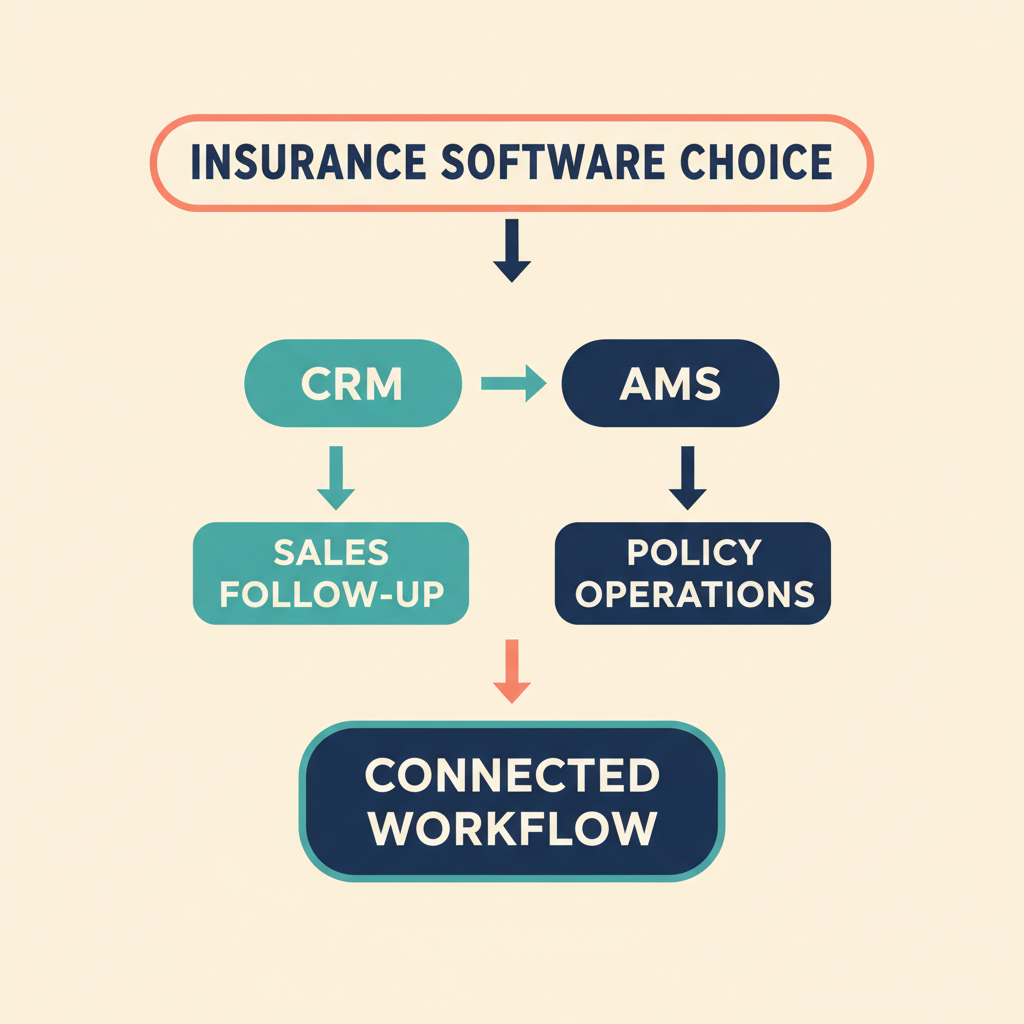
Start with the work that is failing today. If referrals sit unanswered, producers lose context after meetings, marketing leads are hard to route, or managers cannot see the next action, a CRM can help. If the real problem is policy servicing, carrier work, documents, commissions, claims, or the client-policy record, begin with an insurance agency management system, often called an AMS.
A CRM and an AMS can work together, but they should not compete for the same source-of-truth role. A CRM manages relationships, opportunities, tasks, outreach, and sales reporting. An AMS manages the insurance operations that keep the agency running. The right choice depends on which job you need the system to do.
The short answer
Choose an insurance-focused AMS first when policy administration and agency operations drive the purchase. Applied Epic, EZLynx, and AgencyBloc are worth evaluating in that category, depending on the agency’s lines of business and operating model.
Choose a general CRM when the agency already has a dependable policy system and needs better lead capture, sales execution, marketing follow-up, or relationship management. HubSpot is a strong fit for marketing-led teams. Pipedrive suits agencies that need simple pipeline discipline. GoHighLevel brings forms, calendars, conversations, and marketing automation into one environment. Close is built for calling, email, text, and fast follow-up. Zoho CRM is for agencies ready to configure and maintain a more flexible system. Salesforce can fit a larger, more complex organization with the budget for administration and implementation.
CRM versus AMS: set the boundary before you buy
A CRM normally organizes leads, contacts, accounts, opportunities, activities, owners, tasks, and communications. An AMS is built around insurance operations, including client and policy servicing, carrier-related work, documents, accounting, and renewals. Product configurations differ, so vendors should demonstrate the agency’s own process rather than a generic workflow.
Give each data type one clear owner:
| Data or workflow | What the CRM can handle | Likely operational owner |
|---|---|---|
| Referral and prospect intake | Source, contact, owner, consent, next action | CRM |
| New-business opportunity | Stages, tasks, stakeholders, outreach, quote status | CRM, linked to insurance records where needed |
| Policy servicing | Relationship context and follow-up tasks | AMS or policy system |
| Renewal preparation | Outreach queue, owner, task, result | AMS data plus CRM workflow |
| Carrier transactions and rating | Reference or linked context | Insurance-specific system |
| Claims, certificates, and policy documents | Controlled link or limited context | AMS, claims, or document system |
| Pipeline reporting | Stage, activity, response time, workload | CRM |
| Retention and book-of-business reporting | Joined sales and policy outcomes | CRM and AMS together |
Adding fields called “policy number” or “renewal date” does not make a general CRM an AMS. In the other direction, an AMS should not be assumed to deliver the lead-routing and marketing workflow a sales team expects. The useful question is whether each system has a defined responsibility and a tested handoff.
What every insurance CRM evaluation should test
Lead capture and follow-up
A referral, website inquiry, LinkedIn prospect, or cross-sell opportunity should receive an owner, a stage, a source, and a next activity. Test duplicate matching, reassignment, reminders, activity history, and the handoff between producer and service staff.
For many agencies, a small set of stages works better than an elaborate pipeline: New inquiry, needs review, quote requested, quote presented, won, lost, and nurture. Create separate pipelines only where the underlying work is genuinely different.
Renewal preparation
A CRM can turn reliable policy dates and account context into a useful renewal queue. Test a 120-, 90-, 60-, and 30-day workflow: assign an owner, create a review task, log outreach, escalate a stalled account, and capture the result. The AMS or policy system should remain authoritative for policy records unless the agency deliberately assigns ownership another way.
Integrations and data ownership
Ask what each connection actually does. Does it create a contact, update a field, add an activity, attach a document, link a policy record, or only send a notification? Confirm direction, frequency, duplicate handling, field mappings, overwrite rules, failures, retries, and audit history.
Classify every connection as native, marketplace, API, or middleware. An API is not automatically a ready-to-run integration for an agency’s records.
Permissions and governance
Create test accounts for a producer, service representative, manager, and administrator. Check record visibility, field visibility, notes, attachments, exports, deletion rights, audit history, MFA, retention, and access to sensitive information.
Software can provide controls, but it cannot guarantee an agency’s compliance. The agency remains responsible for configuration, contracts, consent, records retention, staff training, supervision, and decisions about sensitive data in a general CRM.
Reporting and adoption
Build the reports that leadership needs before rollout: inquiries by source, speed to first response, opportunities without a next action, quote-to-bind conversion, renewal outreach completed on time, pipeline by producer, and stalled stages. Retention and bound-policy outco
HubSpot
- Best fit
- Marketing-led agencies
- Lead capture and follow-up
- Contacts, companies, activities, forms, marketing, and pipelines create a strong front end for inbound and referral follow-up
- Renewal and insurance fit
- Can model dates and custom records, but does not replace an AMS
- Governance, reporting, and adoption
- Broad reporting and configurable permissions; required plan scope and setup should be priced before rollout
Pipedrive
- Best fit
- Agencies focused on sales discipline
- Lead capture and follow-up
- Activity-based pipeline for referrals, new business, and next-step accountability
- Renewal and insurance fit
- Useful for renewal tasks when policy details stay in an AMS
- Governance, reporting, and adoption
- Keep the field model lean; test automations, reporting, visibility, and mobile use on the selected plan
GoHighLevel
- Best fit
- Agencies with an inbound, appointment, and nurture motion
- Lead capture and follow-up
- Forms, calendars, conversations, pipelines, custom fields, and workflows
- Renewal and insurance fit
- Can represent renewal work, but is not a policy or carrier system
- Governance, reporting, and adoption
- Test sub-account roles, data visibility, exports, reporting, duplicate behavior, and AMS connections
Close
- Best fit
- Conversation-heavy producer teams
- Lead capture and follow-up
- Calling, email, text, sequences, and follow-up activity are close to the opportunity record
- Renewal and insurance fit
- Suitable for new-business and renewal outreach, not policy administration
- Governance, reporting, and adoption
- Test roles, lead visibility, exports, retention, and the reports managers need
Zoho CRM
- Best fit
- Agencies that can support configuration
- Lead capture and follow-up
- Flexible leads, contacts, deals, automation, and custom workflows
- Renewal and insurance fit
- Can hold insurance-related fields and tasks without replacing policy operations
- Governance, reporting, and adoption
- Roles, profiles, analytics, and customization offer scope, but governance needs an owner
Applied Epic
- Best fit
- Independent agencies where operations lead
- Lead capture and follow-up
- Evaluate lead and referral workflow in the agency’s operating model
- Renewal and insurance fit
- Insurance-focused AMS candidate; assess client, policy, carrier, document, accounting, and renewal processes in a demo
- Governance, reporting, and adoption
- Confirm permissions, reporting, integrations, migration, and producer usability for the actual lines of business
EZLynx
- Best fit
- Agencies looking for insurance operating tools
- Lead capture and follow-up
- Evaluate intake beside the broader management workflow
- Renewal and insurance fit
- Insurance-focused system; assess quoting, servicing, accounting, and renewal needs in a demo
- Governance, reporting, and adoption
- Confirm carrier connectivity, documents, exports, permissions, reporting, and mobile use directly
AgencyBloc
- Best fit
- Life and health agencies
- Lead capture and follow-up
- Test lead routing and sales activity against the agency process
- Renewal and insurance fit
- Relevant when policy, commission, and agency workflows are central
- Governance, reporting, and adoption
- Confirm current integrations, roles, reporting, migration, and usability in a product demonstration
Salesforce
- Best fit
- Larger agencies with implementation capacity
- Lead capture and follow-up
- Highly configurable leads, accounts, opportunities, automation, and reporting
- Renewal and insurance fit
- Can support a complex architecture, but needs a deliberate AMS boundary
- Governance, reporting, and adoption
- Governance and extensibility are strengths; administration effort and adoption are buying criteria
against the agency process
This is a shortlist, not a claim that every system has equal insurance depth. A general CRM makes sense when the agency has a clear plan for the operational insurance system. An AMS makes sense when insurance operations are the harder problem.
Platform-by-platform buying guidance
HubSpot: for agencies where marketing creates pipeline
HubSpot is a practical option when forms, content, referrals, meetings, and marketing follow-up drive new business. Its CRM centers contacts, companies, activities, reporting, and a unified customer-data model. HubSpot documents custom objects as an Enterprise feature, so an agency should price the required edition and determine whether a simpler association and field model will be easier to maintain. Use it for prospect and opportunity work, then connect it to the AMS instead of recreating policy administration in the CRM.
Pipedrive: for consistent next-step discipline
Pipedrive is well suited to a small agency where the main failure is an unanswered referral or an opportunity without a next step. Start with a few stages, a clear owner, source, line of business, renewal date, and next activity. Let the AMS retain policy detail. Confirm automation limits, visibility rules, reporting requirements, and mobile behavior for the selected plan.
GoHighLevel: for appointment and nurture workflows
HighLevel positions its product around CRM, forms, funnels, conversations, calendars, sales pipelines, workflows, and automation. That can suit an agency with a strong inbound, appointment, and nurture process. It can represent renewal fields and tasks, but it should not be treated as a policy-management or carrier system. Test roles, assigned-data visibility, exports, reporting, duplicates, and the proposed insurance-system connection.
Close: for teams that work through conversations
Close is a reasonable choice when producers spend much of the day calling, emailing, texting, and following up. Use it for new-business and renewal outreach when the policy record is held elsewhere. Test lead visibility, workflow steps, exports, retention, and management reporting with the agency’s data model before committing.
Zoho CRM: for tailored operating models
Zoho CRM has a broad automation and integration environment with roles, profiles, analytics, and customization. It can fit an agency that wants a tailored process and has someone accountable for maintaining it. Define naming conventions, required fields, duplicate rules, permissions, and report definitions before importing real records. Keep policy administration and carrier operations in the appropriate insurance system.
Applied Epic, EZLynx, and AgencyBloc: when insurance operations come first
These are not simply more customized sales CRMs. They belong in the evaluation when client-policy records, servicing, quoting, renewals, documents, commissions, accounting, or carrier connections are central to the purchase. Ask each vendor to demonstrate a new account, a policy change, an approaching renewal, a document request, a carrier interaction, and a management report using sample agency records. Check producer usability and permissions as closely as operational depth.
Salesforce: for complex organizations that can fund the work
Salesforce can support a sophisticated architecture for agencies with complex teams, multiple data domains, and a real implementation budget. Its flexibility requires governance, administration, and training. It is a better fit when the agency is prepared to own that work, not merely when it wants a long feature list.
Where LeadCRM fits after you choose the CRM
LeadCRM is not a CRM, AMS, policy-management platform, rating engine, claims system, or compliance solution. It is a complementary LinkedIn and Sales Navigator workflow for an agency that has already chosen a CRM.
For agencies using HubSpot, Pipedrive, GoHighLevel, Close, Zoho CRM, or Salesforce, LeadCRM can move LinkedIn prospecting context into that existing CRM workflow. Teams can map prospect data and preserve relevant activity so a producer has the context needed for follow-up without copying it manually between systems. The destination CRM remains the system that manages its pipeline, permissions, reports, and day-to-day sales process.
This is useful when commercial prospecting, referral-partner development, or business-contact outreach begins on LinkedIn. It does not change the AMS boundary. Policy, servicing, carrier, claims, accounting, and compliance responsibilities stay with the systems and processes selected for them.
Learn more about LeadCRM’s LinkedIn-to-CRM workflow and the LinkedIn-to-CRM data sync workflow.
For an unsupported destination: use a controlled Google Sheets bridge
If the chosen CRM or AMS is not a supported LeadCRM destination, Google Sheets can act as a controlled bridge. LeadCRM can write mapped prospect data to a sheet, after which the destination system may import it, consume it through an API, or receive it through approved middleware such as Zapier.
That bridge is not direct synchronization. Treat it as a separate integration project:
- Define the minimum columns and exclude unnecessary sensitive information.
- Restrict the sheet to approved users and records.
- Validate duplicates, owner, consent, required fields, and destination IDs.
- Automate or import the create and update action in the destination system.
- Capture failures, retries, and reconciliation results.
- Archive or delete bridge data under the agency’s retention policy.
Test mappings, duplicates, rate limits, failures, retries, access controls, and retention before moving real client data. Do not describe a Sheets or middleware bridge as direct LeadCRM sync to an unsupported CRM or AMS.
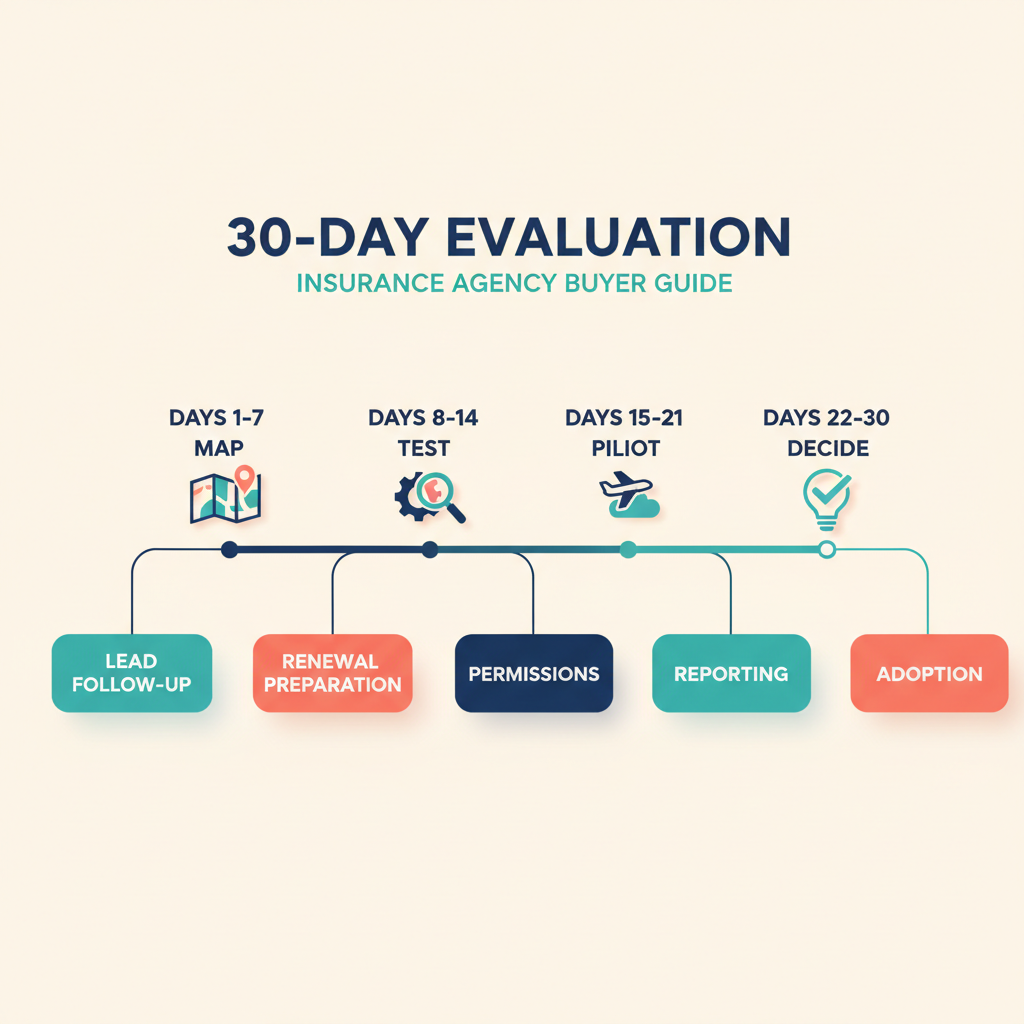
A 30-day evaluation that produces evidence
Days 1 to 5: Map lead sources, policy and document systems, required fields, renewal signals, owners, permission groups, and management reports.
Days 6 to 12: Build one new-business pipeline and one renewal task flow with non-sensitive sample records. Test producer, service, manager, and administrator access.
Days 13 to 20: Create, update, match, duplicate, and delete test records. If the selected CRM is a supported LeadCRM destination, test the LinkedIn prospecting workflow there. Use the Google Sheets bridge only when the selected destination is unsupported.
Days 21 to 25: Run response-time, pipeline, renewal, and workload reports. Have producers complete the process on desktop and mobile. Record where they hesitate or bypass the workflow.
Days 26 to 30: Document system ownership, failure handling, data retention, training, implementation cost, and the evidence required for rollout.
Questions for the final vendor demo
- Can you demonstrate a referral from capture through assignment, quote follow-up, and outcome?
- Can you show a renewal workflow using our dates, owners, stages, and escalation rules?
- Which system owns policy details, documents, commissions, claims, and carrier transactions?
- Which integrations are native, marketplace, API, or middleware-based?
- What happens when a duplicate or failed sync occurs?
- Can producers see assigned records while managers have the appropriate wider view?
- How do exports, audit history, deletion, retention, and access changes work?
- Which features require a higher edition, add-on, implementation partner, or custom development?
- Can management run the required reports without spreadsheet cleanup?
- Who owns migration, configuration, training, and post-launch support?
The bottom line
Start with an AMS when policy operations are the difficult part. Start with a general CRM when the agency already has that operating foundation and needs a disciplined way to capture, qualify, and follow up with prospects.
HubSpot, Pipedrive, GoHighLevel, Close, and Zoho fit different sales and adoption profiles. Applied Epic, EZLynx, and AgencyBloc deserve attention when insurance operations drive the decision. Salesforce can suit a larger implementation, but only with the governance and adoption budget to match.
Once the agency has selected its CRM, LeadCRM can complement supported CRM destinations by moving LinkedIn prospecting context into the workflow already used by the team. For an unsupported destination, a Google Sheets and approved middleware bridge may be workable, but it needs more control and testing than a direct destination workflow. Start a free LeadCRM account.
FAQ
What is the best CRM for insurance agents?
There is no universal winner. Choose an AMS when policy and agency operations dominate. Choose HubSpot for marketing-led growth, Pipedrive for a focused sales pipeline, GoHighLevel for appointment and nurture workflows, Close for conversation-heavy follow-up, or Zoho when configuration and ecosystem breadth justify the effort.
Can a general CRM manage insurance renewals?
A general CRM can manage renewal queues, tasks, reminders, and outreach when it receives reliable policy dates and account context. It does not become a policy-administration system by doing so.
Is LeadCRM an insurance CRM or AMS?
No. LeadCRM complements an existing CRM by moving LinkedIn and Sales Navigator prospecting context into supported CRM destinations. It does not manage policies, servicing, carrier activity, claims, or accounting.
Can LeadCRM connect directly to Applied Epic or EZLynx?
This package does not establish a direct LeadCRM destination for either system. A Google Sheets bridge or separate middleware project may be possible, but it needs its own mapping, permissions, retention, and failure testing.
Does a CRM guarantee insurance compliance?
No. A CRM may support access controls, logs, documentation, and retention workflows. The agency remains responsible for its obligations, configuration, vendor review, data handling, consent, supervision, and staff practices.
Sources
- HubSpot CRM
- HubSpot custom objects
- Pipedrive products
- GoHighLevel
- Close
- Zoho CRM
- Applied Epic
- EZLynx management system
- AgencyBloc
- Salesforce Insurance
- LeadCRM LinkedIn CRM integration
- LeadCRM LinkedIn-to-CRM data sync
- LeadCRM Google Sheets integration
- Zapier Google Sheets integrations
PHP: 2026-08-31 05:05:13 [notice X 0][/var/www/leadcrm.io/wp-content/plugins/elementor-pro/vendor_prefixed/php-di/php-di/src/Definition/Resolver/ParameterResolver.php::34] ElementorProDeps\DI\Definition\Resolver\ParameterResolver::resolveParameters(): Implicitly marking parameter $method as nullable is deprecated, the explicit nullable type must be used instead [array (
‘trace’ => ‘
#0: Elementor\Core\Logger\Manager -> shutdown()
‘,
)]