Trying to find an email address from a LinkedIn profile is one of the most common friction points in B2B sales and recruiting. While LinkedIn is the world’s largest professional database, it is a “walled garden”—contact information is rarely public.
Whether you are a researcher looking for a single contact or a sales rep building a list of 5,000 prospects, you need a reliable workflow.
In this guide, we cover the 5 most effective ways to find emails on LinkedIn in 2026—ranging from free manual OSINT hacks to advanced “Waterfall Enrichment” used by high-growth teams.
Quick Summary: Which Method is Right for You?
Short on time? Choose the method that matches your volume and budget.
| If you need… | Use method… | Cost |
|---|---|---|
| 1–5 emails / week (Zero budget) | Method 1 & 2 (Manual & Google search) | Free |
| High accuracy (Verified data) | Method 3 (Permutation + verification) | Free tools |
| Speed (1-by-1 prospecting) | Method 4 (Browser extensions) | Freemium |
| Scale (Bulk lists / Sales Nav) | Method 5 (Waterfall enrichment) | Paid |
Is It Legal to Find Emails on LinkedIn?
Before starting, it is vital to distinguish between “finding” and “hacking.”
Yes, it is generally legal to find business email addresses, provided you rely on Publicly Available Information (PAI) and legitimate data enrichment.
- Compliant: Using tools that aggregate public data or use algorithms to predict business emails (e.g., [email protected]).
- Non-Compliant: Using software that logs into user accounts unauthorized or scrapes private data behind privacy settings.
- Best Practice: Always aim for B2B emails. Personal emails (@gmail.com) fall under stricter GDPR/CCPA consumer protections.
Method 1: The Manual "Profile Hunt" (Free)
Best for: Zero-budget research on specific targets.
If you only need to find an email address from a LinkedIn profile occasionally, you don’t need expensive software. You can often find the data manually if you know where to look.
1. The "Contact Info" Tab
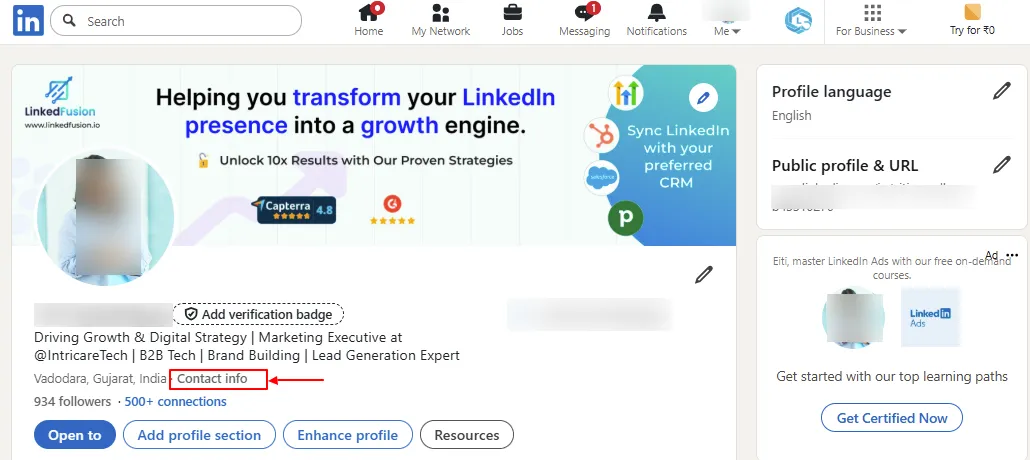
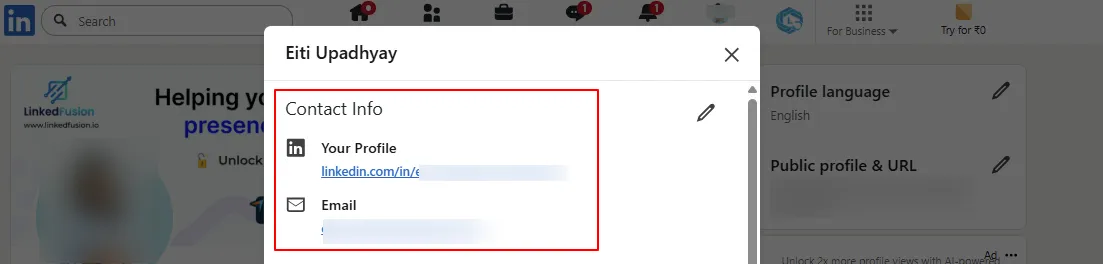
Go to the target profile and click the blue Contact info link in the header.
- Pros: It’s official data provided by the user.

- Cons: Low success rate (~30%). Even when present, it is often a personal email, which is less ideal for CRM matching.

2. The "About" Section (Ctrl + F)
Many users—especially consultants, founders, and creators—hide their email in their bio to avoid bots while staying accessible to humans.
- The Trick: Users often obfuscate the format to trick scrapers.
- How to find it: Open the profile, press Ctrl + F (or Cmd + F), and search for:
- “gmail”
- “at” (for name [at] domain)
- “dot” (for domain [dot] com)
Method 2: Google "X-Ray" Search
Best for: Finding data that is hidden on the profile but cached by Google.
If the email isn’t visible on the live profile, Google might still have it indexed. This is known as “X-Ray searching.”
Copy and paste these operators into Google:
- To find a specific person: site:linkedin.com/in/ “Target Name” “email”
- To find a Gmail address: site:linkedin.com/in/ “Target Name” “gmail.com”
- To find a business email: site:linkedin.com/in/ “Target Name” “@companyname.com”
Why it works: Google scrapes LinkedIn continually. Sometimes contact info appears in the search snippet even if the user has recently updated their privacy settings.
Method 3: Permutation & Verification (The Logic Method)
Best for: High accuracy without paying for database credits.
Most companies follow a standardized email format (e.g., [email protected]). If you know the prospect’s name and company domain, you can deduce their email.
Step 1: Guess the Pattern
Common corporate patterns include:
- [email protected] (Most common)
- [email protected]
- [email protected] (Common in startups)
Step 2: Verify the Guess (Crucial)
Warning: Do not guess blindly. Sending emails to invalid addresses ruins your sender reputation. You must verify the guess first.
The Workflow:
- Generate the permutation (e.g., [email protected]).
- Use a free tool like LeadCRM’s Email Verifier.
- Check the Status: Look for a “Valid” or “Safe to Send” result. This confirms the mailbox exists without you having to send a test email.
Method 4: Browser Extensions (The Standard Way)
Best for: Sales reps prospecting one-by-one.
The most popular way to find email addresses from LinkedIn is using a Chrome extension. Tools like Apollo, ZoomInfo, or LeadCRM add a “Reveal” button directly to the LinkedIn interface.
The Hidden Problem: Data Decay
Most extensions rely on static databases. If they scraped a profile 6 months ago, that data sits in their system.
- The Stat: B2B data decays at a rate of roughly 2.1% per month (Source: Marketing Sherpa). People change jobs, companies rebrand, and domains expire.
- The Risk: Relying on a static database often yields “bounced” emails because the data is stale.
The Solution: Live Extraction
Newer tools like LeadCRM focus on “Live Capture.”
- Live Data: It captures the job title and company directly from the screen (0% decay).
- Real-Time Sync: It pushes this live profile data to your CRM, ensuring you aren’t importing outdated job titles.
Method 5: Waterfall Enrichment (The Pro Way)
Best for: Bulk prospecting and maximizing match rates.
If you rely on a single data provider, you will typically hit a “Not Found” rate of 30–40%. No single database has every email in the world.
Waterfall Enrichment solves this by chaining multiple providers together.
How Waterfall Works
Instead of asking just one vendor, a tool like LeadCRM automates a “cascade” of requests:
- Check Provider A: (e.g., LeadCRM internal). Found? Stop.
- If not, Check Provider B: (e.g., Apollo integration). Found? Stop.
- If not, Check Provider C: (e.g., Hunter or Dropcontact).

Why use this?
- Higher Match Rates: By combining sources, you can increase your “email found” rate significantly compared to using a single tool.
- Sales Navigator Export: Waterfall tools often include features to “Bulk Export” searches from Sales Navigator, finding emails for 500+ prospects in one click while handling the verification logic in the background.
Frequently Asked Questions (FAQs)
Can I find someone’s email address directly on LinkedIn?
Yes, but only in limited cases. Some users list their email address in the Contact Info section or About section of their LinkedIn profile. However, this information is optional and often hidden, so the success rate is relatively low.
Is it legal to find email addresses from LinkedIn profiles?
Yes, it is legal as long as you use publicly available information and compliant enrichment tools. Finding business emails (e.g., [email protected]) is generally allowed. Scraping private data, bypassing privacy settings, or collecting personal emails can violate LinkedIn’s terms and data protection laws like GDPR.
What is the easiest way to find an email from LinkedIn for free?
The easiest free methods are:
- Checking the Contact Info and About sections
- Using Google X-Ray searches
- Guessing the company email format and verifying it with a free email verifier
These methods work best when you only need a few emails per week.
What is email permutation, and why does verification matter?
Email permutation means guessing a company’s email format (e.g., [email protected]). Verification is critical because sending emails to invalid addresses can damage your sender reputation and email deliverability. Always verify before sending.
What is Waterfall Enrichment?
Waterfall enrichment is a process where multiple data providers are checked sequentially until an email is found. If one provider fails, the system automatically checks the next. This significantly improves email match rates compared to using a single database.
Summary: How to Choose?
To find an email address from LinkedIn successfully, match the method to your goal:
- Manual Search (Hacks): Great for “detective work” on high-value targets.
- Google X-Ray: Useful when LinkedIn profiles are locked down.
- Permutation: The best free method if you are willing to do the manual work of verification.
- Browser Extensions: The standard for daily sales prospecting.
- Waterfall Enrichment (LeadCRM): The superior choice for bulk lists and ensuring the highest possible data accuracy.
Ready to start? Stop guessing and start verifying. Try LeadCRM to leverage waterfall enrichment and sync verified emails directly to your CRM.

Article written by
Arpan Shah
Arpan Shah is the Founder at LeadCRM with 13+ years in B2B SaaS and martech. He writes about CRMs, LinkedIn-to-CRM workflows, integrations, lead enrichment, and practical growth playbooks that help teams streamline lead capture and keep CRM data accurate.